Principle of Least Privilege: Examples and Application
Learn least privilege through a worked access decision: limit actions, resources, and time, check inherited permissions, and keep legitimate work possible.
What least privilege means in practice
The principle of least privilege (PoLP) means giving a person, application, or process only the permissions needed for its assigned work. Define the actions it may perform, the resources it may reach, and when that access is needed. A contractor correcting a few event descriptions should not become an administrator of the entire publishing system.
The purpose is to limit consequences. A stolen account or an honest mistake can affect what that identity is allowed to reach. Narrow permissions reduce that reach, although they cannot stop every exploit or misuse of legitimate access. NIST’s least-privilege definition applies to system entities and their functions, not just human administrators.
Least privilege concerns authorization: what an identity may do. Strong authentication helps establish who is signing in; it does not decide which files they should edit. The guide to authentication, authorization, and sessions explains how these decisions connect.
Worked example: an editor needs access for two weeks
Suppose a freelance editor is hired to correct descriptions for one event series. The tempting shortcut is to copy a permanent employee’s account permissions. That can bring unrelated rights the contractor never requested.
A better starting point is the actual workflow: read the assigned drafts, correct their text, and save changes for review. In a publishing system that supports these controls, the access decision could look like this:
| Requested capability | Decision for this assignment |
|---|---|
| Read and edit assigned drafts | Allow for the contract period |
| Edit other publications | Leave ungranted |
| Publish changes to the public site | Keep with the publication reviewer |
| Change billing or grant access to others | Leave ungranted |
Check the workflow with the editor before approving it. If editing requires seeing an image or reference page, include that dependency deliberately. If the platform cannot separate editing from publishing, record the limitation and choose a supervised workflow or another suitable control. Calling a broad built-in role “Editor” does not make its permissions appropriate.
Read-only access also deserves scrutiny: reading a full customer export can be consequential without changing a single record. Least privilege limits data scope as well as destructive actions.
Apply the same reasoning to administrators and automation
Administrators need elevated permissions for some tasks, not for every activity. Separate ordinary work from administration, and choose the narrow administrative role that fits the change. New Zealand NCSC guidance recommends separate accounts for administrative and everyday use. Pair privileged access with phishing-resistant MFA and secure recovery; an appropriately scoped account still needs protection against takeover.
The principle also applies when nobody is at a keyboard. A job that updates a test-site image library should not inherit production-wide authority because it runs unattended. Give it an identifiable owner and permissions for its own operation. AWS’s IAM guidance recommends temporary workload credentials and permissions scoped by actions, resources, and conditions. The secrets-management guide covers how credentials are issued, stored, and replaced.
Check connected applications separately from the human account. An application grant may authorize background activity that is easy to miss in a list of employee roles. Use the existing guide to OAuth consent and connected applications when reviewing what an integration can do.
Reduce standing access without blocking urgent work
Just-enough access narrows actions and resources. Just-in-time access makes extra authority available when needed for a bounded period. A temporary administrator grant may reduce exposure time while still granting far too much authority during that window.
For example, a site operator could request permission to restart one application for an approved maintenance window. The request should name the task, resource, approver, and expiry. Microsoft documents time-based and approval-based role activation in Entra Privileged Identity Management; the exact mechanism depends on the platform.
Verify what expiry actually ends. Check active sessions, tokens, and any new credentials or permissions created during the window. A scheduled end date is a control to test, not a reason to assume every access path has disappeared.
Keep a protected emergency route for failures in the normal approval or identity system. Give it clear custody, monitoring, and periodic checks rather than using it for routine work. Microsoft’s emergency-access account guidance illustrates this separate recovery requirement.
Find the access that a role list can miss
Permissions accumulate when people change jobs, help on projects, or retain temporary exceptions. This is privilege creep. Review access after a role change, contract end, or application retirement as well as on a planned schedule.
Look at effective access: the result of the permissions that actually apply. Direct assignments, group membership, inherited access, resource-sharing rules, and connected-app grants can provide different routes to the same data. Policy evaluation varies by platform; do not assume permissions simply add together everywhere. AWS’s policy documentation describes its own evaluation model.
Before removing a grant, establish what legitimate work depends on it. Then verify both outcomes in an authorized test environment or controlled access check: the required task succeeds, and an unrelated or higher-impact action is denied. OWASP’s authorization guidance recommends permission tests, default denial, and checks on every request. Hiding a button is insufficient if the underlying request still works.
Last-used records help identify candidates for review, but absence of recent use alone does not prove a permission is unnecessary. Seasonal tasks and recovery procedures need an owner’s assessment. A useful review records the business purpose, actual access paths, decision, and next review trigger.
Least privilege, separation of duties, and zero trust
These concepts answer related questions:
- Least privilege: how little authority lets this identity complete its task?
- Separation of duties: which consequential steps should require different people or roles?
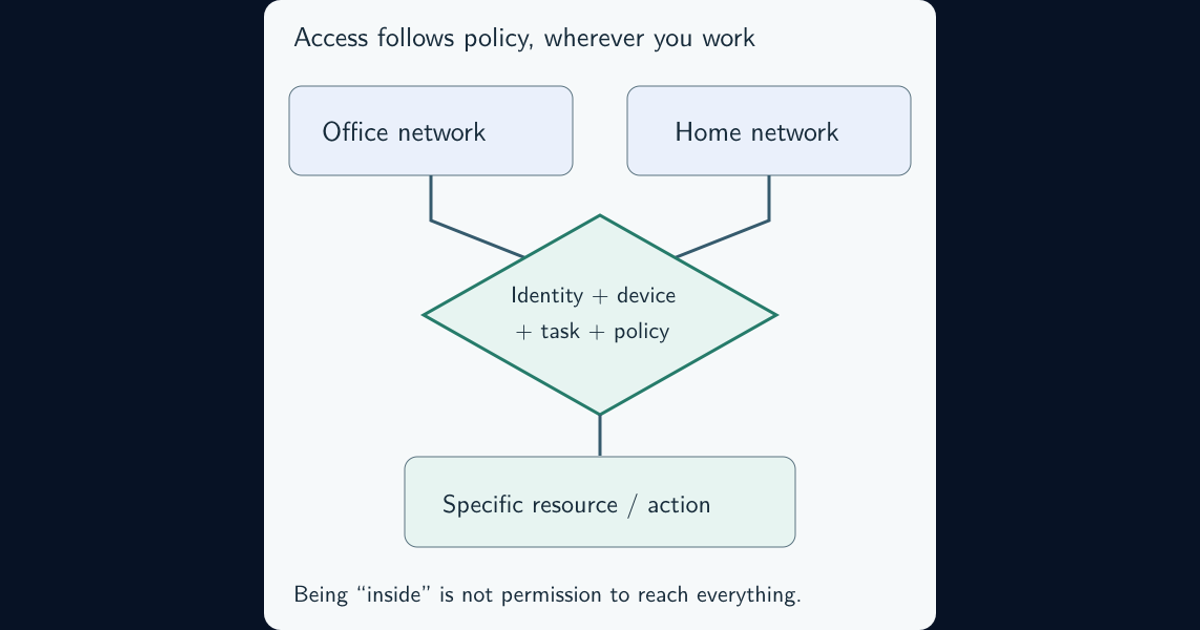
- Zero trust: what evidence and policy should govern access without relying on implicit trust from network location or ownership?
In the editor example, limiting edits to assigned pages is least privilege. Keeping final publication with a reviewer is separation of duties. A policy requiring an approved identity and appropriate device before access is part of a broader zero-trust design. The Canadian Cyber Centre’s access-control guidance distinguishes least privilege from separation of duties; NIST’s zero-trust architecture describes the wider model.
For a first improvement, choose one high-impact account or integration. Use everyday cybersecurity risk to prioritize by the consequences of misuse. Write down the required task, allowed actions, resource scope, access lifetime, and owner. Compare that record with the effective permissions. Resolve one unnecessary route and verify the result before expanding the review. The goal is a working boundary that survives normal work, staff changes, and mistakes.
Frequently asked questions
Does giving someone a role implement least privilege?
Only if the role and its resource scope match the actual work. Built-in roles, inherited permissions, group memberships, and other grants may still give the identity more access than it needs.
Is read-only access always low risk?
No. Read-only access can expose sensitive information or enable bulk copying. Limit which records and collections an identity can read, not only which actions can change data.
Is just-in-time access the same as least privilege?
Just-in-time access limits when extra permissions are active. Least privilege also limits the actions and resources those permissions cover. A short-lived broad administrator grant may still exceed the task’s needs.