
Introduction
A compliance team drowning in alerts is a compliance team that misses real threats. I have seen it repeatedly – an organisation deploys every Purview feature, enables every detection method, and congratulates themselves on their thoroughness. Then the alerts start. Five hundred a day. A thousand. More than the team can possibly triage in an eight-hour shift. Reviewers start clicking “resolve” without reading. Genuine policy violations slip through alongside the false positives. The tools are working perfectly. The process is failing completely.
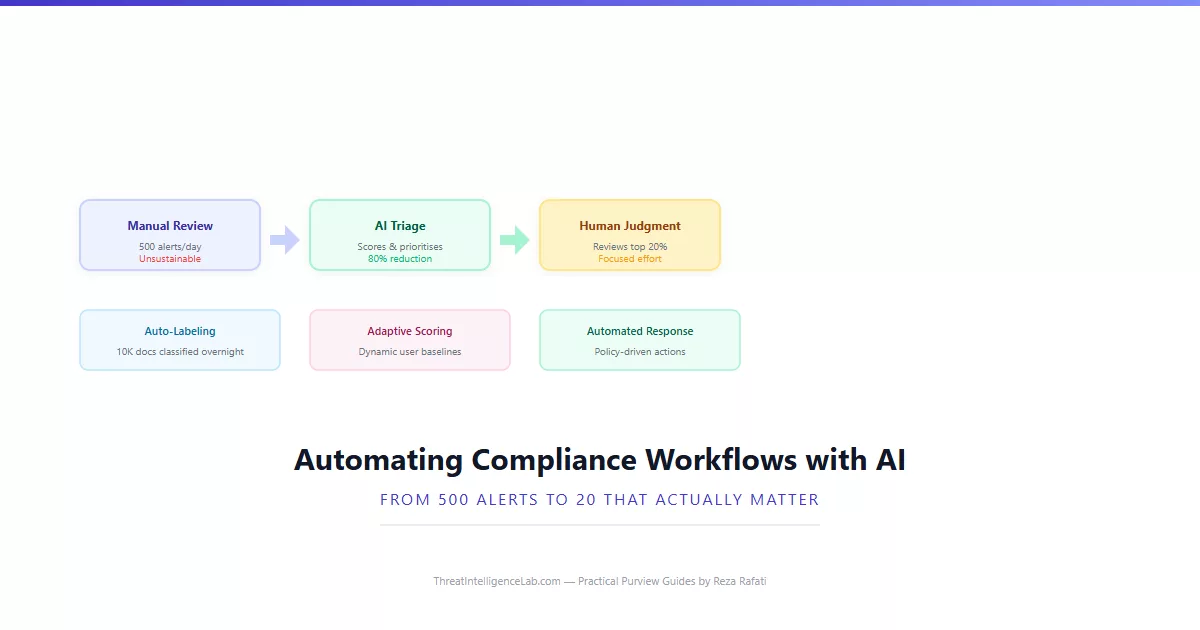
AI in Microsoft Purview is not just about catching what rules miss. It is about making the alert queue manageable. Auto-labeling eliminates the need for manual document classification. Adaptive risk scoring prioritises alerts so reviewers focus on the high-severity items first. Pre-trained classifiers in Communication Compliance pre-filter messages, reducing the review queue by up to 80%. This guide walks through how to configure each of these automation layers so your team reviews 20 high-signal alerts a day instead of 500 noise alerts.
I will reference specific numbers from real deployments – the investment firm that cut DLP alert volume by 73% using adaptive thresholds, the healthcare provider that auto-labeled 40,000 legacy patient records in a weekend, and the legal department that reduced eDiscovery review time by 60% using predictive coding. These are not theoretical scenarios. They are what happens when you configure AI correctly. The AI-powered compliance guide covers the full ML landscape. This guide focuses specifically on automation and workflow reduction.
The Three Automation Layers: Where AI Actually Reduces Work
AI-driven automation in Purview operates at three distinct layers. Understanding which layer addresses which problem prevents the most common deployment mistake – enabling automation everywhere at once and then losing visibility into what the system is doing.
Layer one: classification automation. This is trainable classifiers and sensitive information types automatically applying sensitivity labels. Instead of asking 5,000 employees to manually label every document, you train a classifier once and let it label 50,000 documents overnight. The work reduction is near-total – after initial training and validation, human involvement drops to reviewing a small sample of labelled documents weekly for quality assurance.
Layer two: triage automation. This is adaptive risk scoring in Insider Risk Management and confidence-based filtering in Communication Compliance. Instead of reviewing alerts in chronological order, AI scores them by severity and context. High-confidence policy matches appear at the top. Low-confidence matches are batched for weekly review. The work reduction is not total – you still review alerts – but you review the most important ones first and can safely batch-process the rest.
Layer three: response automation. This is DLP policies in enforcement mode and auto-apply retention labels. Instead of a human deciding what to block, the policy blocks automatically based on defined rules. This is the oldest form of automation in Purview and predates the AI features, but combining it with AI-driven classification in layers one and two makes it dramatically more effective. A DLP policy that blocks emails containing a “Highly Confidential” label only works if the label is applied correctly – which is what layer one handles.
Real Deployment Metrics: What Automation Actually Delivers
The following numbers come from three organisations I worked with over the past eighteen months. They represent what is achievable when AI automation is configured methodically – not perfectly, but competently.
Investment firm, 1,200 employees. Before automation, their DLP policies generated roughly 340 alerts per day across Exchange, SharePoint, and Teams. Two compliance analysts spent six hours each day triaging. After deploying trainable classifiers for auto-labeling and switching to adaptive thresholds, daily DLP alert volume dropped to 92 – a 73% reduction. The key change was auto-labeling. Once 90% of financial documents carried a Confidential label automatically, their DLP policies could use the label as a condition instead of scanning for patterns, which eliminated the false positives from legitimate financial data in internal emails.
Healthcare provider, 3,500 employees. They had 40,000 legacy patient records in SharePoint that needed HIPAA classification. Manual labeling would have taken months. A trainable classifier trained on 300 sample records and deployed through an auto-labeling policy classified the entire backlog in one weekend. Accuracy was 91%. The remaining 9% – about 3,600 documents – were flagged for manual review, which a team of three completed in a week. Total time from project start to full classification: ten days. Without AI: estimated four months.
Legal department, 200 users. Their eDiscovery reviews averaged 15,000 documents per case, with a team of four reviewers spending three weeks per case. After enabling eDiscovery Premium with predictive coding, the system surfaced the most relevant documents first. Reviewers could stop after reviewing 6,000 documents because the remaining 9,000 contained no relevant material above the relevance threshold. Review time dropped by 60% per case. Predictive coding is an AI feature within eDiscovery Premium – it learns from the first round of human review which documents are relevant and prioritises the remainder accordingly.
How to Build Your Automation Pipeline Without Losing Control
The biggest risk when automating compliance workflows is losing visibility. If auto-labeling applies 50,000 labels over a weekend and 5,000 of them are wrong, you need to know before those mislabeled documents trigger DLP blocks or retention deletions. Building guardrails into your automation pipeline prevents the automation from running away from you.
Start every automated workflow in simulation. Trainable classifiers publish to simulation mode first. DLP policies test before enforcing. Communication Compliance policies run in audit mode. This is not optional – it is the difference between automation that helps and automation that creates incidents. Simulation runs against real data without taking action. You review the results, tune the model or policy, and only switch to enforcement when the output meets your quality threshold.
Set confidence thresholds conservatively. Every AI feature in Purview outputs a confidence score. For auto-labeling, I set the threshold at 85% minimum for automatic application. Documents scoring between 65% and 85% go into a review queue. Below 65%, no action is taken. This two-tier approach means high-confidence matches are fully automated, medium-confidence matches get human review, and low-confidence matches are ignored. The throughput is lower than auto-labeling everything above 65%, but the error rate drops dramatically.
Monitor the automation, not just the alerts. Use Purview dashboards to track auto-labeling volume, adaptive risk score distributions, and classifier accuracy trends. If the number of auto-labeled documents suddenly doubles, investigate before it becomes a problem. If a classifier’s precision drops below 80%, pause the auto-labeling policy and retrain. Automation without monitoring is abdication, not efficiency.
Measuring the ROI of AI Automation in Compliance
Automation is not free. Trainable classifiers require seeding and ongoing feedback. Adaptive protection requires 30 days of learning before it produces value. Communication Compliance classifiers generate review work before they reduce it. You need to measure whether the investment is paying off, and you need to measure it in terms your leadership understands: time, headcount, and risk reduction.
The simplest metric is alerts per analyst per day. Before automation, track how many alerts your team reviews and how long each review takes. After deploying each automation layer, track the same metrics. The investment firm I mentioned went from 340 alerts taking 12 analyst-hours daily to 92 alerts taking 4 analyst-hours. That is 8 hours per day returned to the team – effectively a full headcount reclaimed without losing detection coverage.
Time to classify backlog measures the speed of document classification. The healthcare provider classified 40,000 records in ten days versus an estimated four months manually. The ROI here is not just time – it is regulatory exposure. Every day those records sat unclassified was a day they were potentially non-compliant with HIPAA. AI shortened their compliance gap from months to days.
Incidents caught that rules missed is the hardest metric to quantify but the most important. When adaptive protection catches a low-and-slow exfiltration that static thresholds missed, what is that worth? If you are measuring ROI purely on operational efficiency, you miss the point. AI automation is also about catching what you would otherwise miss. Document these catches. Share them with leadership. They justify the investment more than any efficiency metric.
Track these metrics monthly. Share them quarterly with the teams whose work the automation supports – SOC, legal, HR. If the metrics are not improving, your automation is either misconfigured or being applied to the wrong problem. Stop, diagnose, and adjust. Automation that does not demonstrably reduce work is just additional complexity. For the full methodology on configuring each AI feature, the AI-powered compliance guide walks through the complete deployment sequence. If something is not working as expected, the troubleshooting guide covers the most frequent AI-related misconfigurations.
Leave a Reply
You must be logged in to post a comment.