Microsoft Purview Sensitivity Labels: Design, Deployment, and Best Practices
Build a practical sensitivity-labeling model in Microsoft Purview that users can understand, automation can enforce, and security teams can use across Microsoft 365.
A Microsoft Purview sensitivity label should communicate a business handling decision, not merely decorate a document with a classification name. The strongest deployments connect a small, understandable classification taxonomy to predictable controls for documents, emails, meetings, Microsoft Teams, Microsoft 365 groups, SharePoint sites, and other supported workloads.
Microsoft describes sensitivity labels as persistent metadata that can travel with an item and trigger protection such as content markings, encryption, and access restrictions. Labels are created centrally in Microsoft Purview and then made available through sensitivity label policies.
Treat the program as an operating model rather than a label-creation exercise. Define what each classification means, decide which controls genuinely belong to it, publish labels to the right populations, automate high-confidence scenarios, measure the resulting behavior, and maintain the taxonomy as business requirements change.
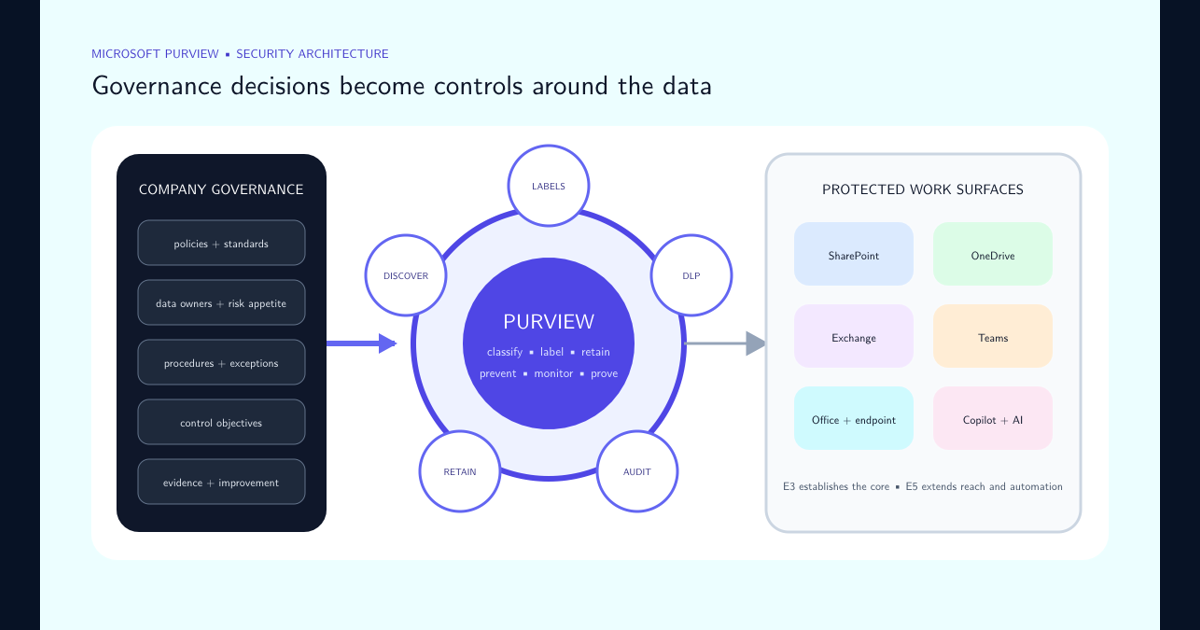
For the wider control model—including licensing, retention, DLP, SharePoint, Copilot, and AI governance—use the Purview E3 versus E5 security architecture guide. It shows where sensitivity labels fit in the complete company security layer.
Start With a Small Business Taxonomy
Begin with the information-classification model, not with every technical option available in the Purview portal. Microsoft recommends naming labels according to the organization’’s existing classification taxonomy and suggests familiar starting points such as Personal, Public, General, Confidential, and Highly Confidential when no taxonomy already exists. Tooltips should help users understand when a label applies and can include short examples. Microsoft also explicitly recommends testing names and tooltips with the people who will use them.
Keep the number of decisions manageable. Microsoft’’s service-assurance guidance describes enterprise classification frameworks as commonly containing three to five levels and recommends no more than five top-level labels with up to five subordinate labels per level so that the interface remains manageable.
A useful taxonomy answers four questions for each label:
- What kind of information belongs here?
- Who is normally allowed to receive or access it?
- What protection is required?
- What would make a user choose a different label?
Avoid creating departmental labels simply because departments exist. Labels such as “Confidential Finance,” “Confidential HR,” “Confidential Legal,” and dozens of similar variations can become difficult to understand and maintain. Create a specialized label or subordinate label when the handling requirement is materially different, not merely because ownership is different.
Good labels describe sensitivity in language users already understand. Technical enforcement remains an implementation detail behind that decision.
Separate Classification From Protection
Do not design the taxonomy by equating every sensitivity level with encryption. A label expresses classification; its configuration determines what happens when that classification is applied.
Lower-sensitivity labels might provide only classification metadata or visible markings. More sensitive labels can add headers, footers, watermarks, encryption, restricted permissions, expiration, or other supported controls. Microsoft specifically uses examples where a General label might apply a header or footer while a Confidential label can add a watermark and encryption.
Encryption is appropriate when access must remain restricted even after information leaves its original location. Microsoft states that label-based encryption can restrict who opens, edits, prints, forwards, or copies protected content, and that encrypted content remains protected at rest and in transit.
The best practice is therefore to define protection from the business requirement:
- Use classification-only labels where identification and downstream policy are sufficient.
- Add visual markings when human recipients need an obvious handling cue.
- Use encryption when persistent authorization controls are necessary.
- Prefer predictable administrator-defined permissions for repeatable scenarios.
- Use user-defined permissions only where business collaboration genuinely requires variable recipients.
- Test encrypted content with Office clients, SharePoint, OneDrive, business applications, automation, eDiscovery, and recovery processes before broad deployment.
Overprotection creates workarounds. Underprotection makes the label cosmetic. A good design imposes the minimum control that reliably meets the information-handling requirement.
Treat Label Priority and Publishing Policies as Architecture
Sensitivity labels are ordered, and that order has meaning. Microsoft advises placing the least restrictive labels toward the top of the sensitivity-label list and the most restrictive labels toward the bottom. Only one sensitivity label can be applied to an individual item or container at a time, and the configured priority participates in downgrade, automatic-labeling, attachment-inheritance, and related behaviors.
Do not treat this ordering as cosmetic. Document the intended progression from least to most sensitive and validate it whenever labels are created, moved, replaced, or reorganized.
Labels are made available to users through sensitivity label policies. Microsoft recommends creating the labels first, configuring their protection, and then publishing them to the users and groups that require them. The same label can be reused in multiple policies, which allows an organization to pilot a taxonomy with a limited population before expanding it.
A mature policy design normally separates three concerns:
- Label availability: which classifications a user is allowed or expected to apply.
- Policy defaults: what happens when the user creates unlabeled content.
- User behavior controls: whether labeling is mandatory and whether lowering or removing a label requires justification.
Microsoft’s default sensitivity-label policy, for example, publishes the default labels tenant-wide, applies a General classification as the default for unlabeled documents, email, and meetings, and requires justification when users remove or lower a classification.
Use policy scope deliberately. A small pilot group should validate terminology, application behavior, external sharing, Office experiences, mobile clients, business processes, and support procedures before the organization makes a restrictive policy universal.
Reduce Dependence on Perfect Manual Labeling
Manual classification remains valuable because users often know the business context of a document better than an automated detector. It should not, however, be the only control protecting thousands or millions of files and messages.
Microsoft supports automatic and recommended application of sensitivity labels to files and emails when configured conditions match. Microsoft explicitly identifies the benefit: organizations do not have to depend entirely on users knowing when every classification applies or manually classifying every piece of content correctly.
Build automation in layers.
First establish a safe default classification for newly created content where that makes sense. A baseline default reduces the volume of completely unlabeled information, but it should not be so restrictive that users routinely downgrade it.
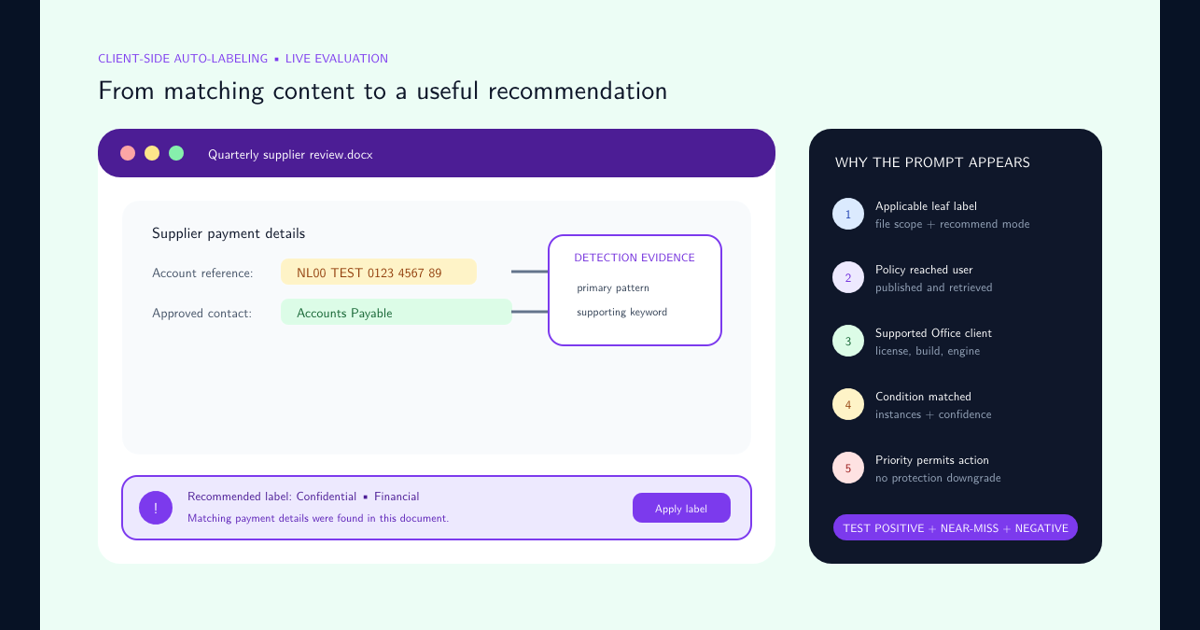
Next use recommended labeling for detection logic that is useful but not yet sufficiently reliable for silent enforcement. Microsoft’’s default client-side configuration demonstrates this approach by recommending labels based on detected sensitive information rather than immediately forcing all classifications.
Then introduce automatic labeling for high-confidence cases. Sensitive information types, exact-data scenarios where supported, trainable classifiers, location context, or other supported conditions can provide stronger evidence than generic keywords. Service-side auto-labeling can address content at rest in supported Microsoft 365 locations, while client-side behavior can act as users work with documents and messages.
Before enforcing an automatic-labeling rule:
- Test it against representative production content.
- Measure false positives and false negatives.
- Confirm what happens when an existing higher label is present.
- Confirm that encryption will not break required workflows.
- Give business owners a way to report bad classifications.
- Monitor label changes and exceptions after rollout.
Automation should make correct classification easier and more consistent, not hide a poorly defined taxonomy.
If a recommendation is configured but does not appear in Word, Excel, or PowerPoint, use the client-side auto-labeling prompt troubleshooting checklist to verify label scope, publication, licensing, client support, GPO, detection logic, priority, and the evaluation event.
Design Item Labels and Container Labels Deliberately
Sensitivity labels can protect more than individual Office documents and email. Microsoft Purview can also use labels with Microsoft Teams, Microsoft 365 groups, SharePoint sites, Loop workspaces, and other supported collaboration containers. A container label can influence settings such as privacy and external access, but labeling the container does not simply apply the same label to every item stored inside it. Microsoft explicitly distinguishes the Groups & sites scope from item-level labeling.
This distinction should shape the architecture.
A label such as Confidential Project Workspace might define how a Team or SharePoint site is configured, who may collaborate externally, and what kind of sharing is permitted. Files inside that workspace can still require their own item-level classifications according to content.
Container controls are especially important because collaboration settings affect many users at once. Microsoft recommends testing new labels configured for sites and groups before tenant-wide publication and advises against changing a label’’s site and group settings after that label has already been applied broadly. Changes can require replication time and some settings do not retroactively remove access already granted to existing guests.
For production design:
- Define separate handling expectations for information and for collaboration spaces.
- Decide whether external users are appropriate at each workspace sensitivity.
- Test Team, group, and SharePoint creation before wide publication.
- Avoid casually repurposing a container label after widespread use.
- Treat changes to external-access behavior as controlled security changes.
- Verify the resulting SharePoint and Teams behavior rather than assuming the label configuration retroactively fixes all previous access decisions.
Make Sensitivity Labels Inputs to the Wider Purview Control Plane
A sensitivity label becomes more valuable when downstream controls understand it. Microsoft explicitly positions sensitivity labels as conditions that can be consumed by other Microsoft Purview capabilities, including Data Loss Prevention and Insider Risk Management.
This allows security policy to reason about business classification instead of rediscovering the sensitivity of the same content independently in every control.
For example, a DLP policy can treat Highly Confidential information differently from General content. Access governance, endpoint controls, collaboration restrictions, monitoring, and AI-related policy can then align with the same information-classification decision where the relevant workload supports it.
Build this integration carefully. A label used as a downstream policy condition effectively becomes part of the security control plane. Renaming, reordering, replacing, or changing the meaning of that label can therefore have effects beyond the visible label itself.
Maintain a dependency register for each production label:
- Publishing policies that expose it.
- Automatic-labeling logic that applies it.
- DLP policies that test for it.
- Encryption and permission behavior.
- SharePoint, Teams, and group settings.
- Endpoint or application integrations.
- Reporting, auditing, and operational procedures.
- Business owners and review dates.
This makes the label taxonomy governable as infrastructure rather than a collection of portal objects.
Roll Out in Controlled Stages, Then Measure Behavior
Sensitivity-label success should be measured by protection outcomes, user comprehension, and policy consistency rather than by the number of labels created.
Start with a representative pilot. Microsoft supports publishing the same centrally defined labels through different policies, which makes limited-user testing a natural deployment approach. During the pilot, measure:
- How often users select each label.
- How often users remove or downgrade labels.
- The reasons supplied for downgrades where justification is enabled.
- How much content remains unlabeled.
- Automatic-labeling matches and overrides.
- User confusion between adjacent classifications.
- Support requests caused by encryption or sharing restrictions.
- External-sharing attempts involving restricted labels.
- Whether protected information remains usable by legitimate business processes.
Tune the taxonomy before expanding it. If two labels are consistently confused, their definitions may be too similar. If users constantly lower a default label, the default may be too restrictive. If a supposedly rare specialized label dominates daily activity, its purpose may actually belong in the main taxonomy.
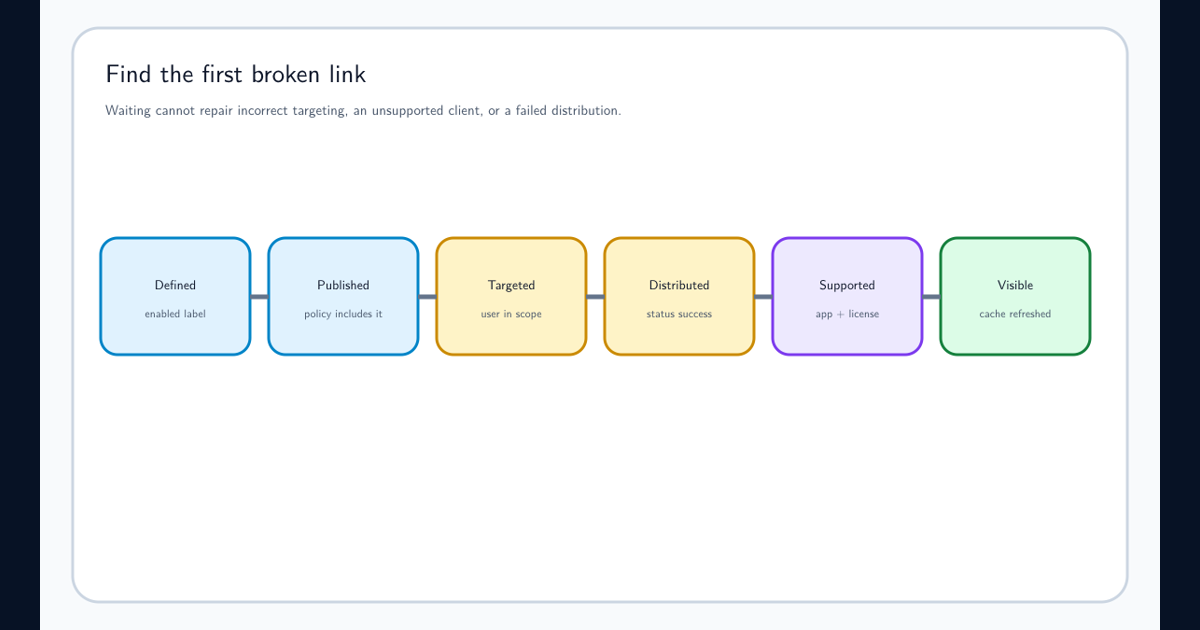
Changes should have owners, test cases, rollback considerations, and a documented reason. Microsoft notes that label and policy changes can take time to propagate across applications and services, so deployment validation should account for replication rather than immediately treating every inconsistent client as a configuration failure. When visibility differs by user or client, use the dedicated missing sensitivity labels workflow to separate publication, targeting, distribution, licensing, client support, and cache failures.
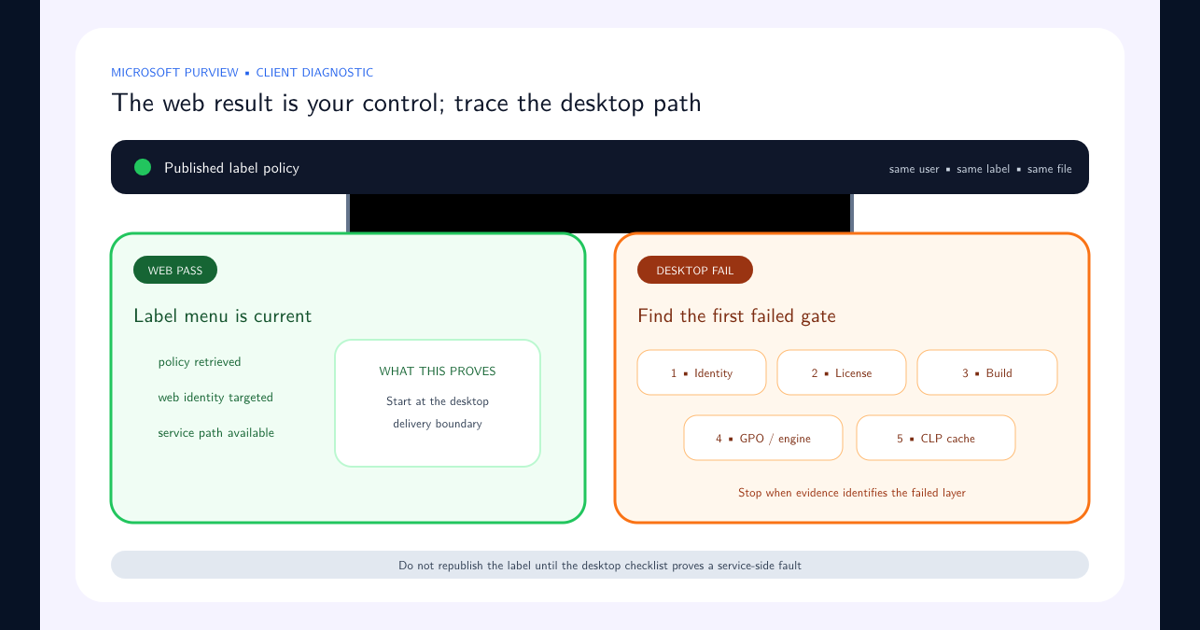
When the label is visible in Microsoft 365 web apps but absent in local Office, use the web-versus-desktop sensitivity label checklist and complete its license, policy, version, update-channel, built-in-labeling, GPO, CLP-cache, and controlled-retest checks in order.
A Practical Best-Practice Baseline
A defensible Microsoft Purview sensitivity-label program can be summarized as a small set of operating rules.
Keep the taxonomy understandable. Use a limited number of sensitivity levels, plain-language descriptions, and concrete examples. Microsoft’’s guidance favors a manageable classification structure rather than an expansive menu of labels.
Order labels correctly. Put lower-sensitivity classifications before higher-sensitivity classifications and treat priority as functional configuration rather than visual sorting.
Define handling separately from the name. Decide explicitly whether each label should add markings, limit external sharing, enforce permissions, apply encryption, or simply provide classification metadata.
Publish through controlled policies. Pilot labels with representative users before broad deployment, use defaults where they establish a sensible baseline, and require justification for meaningful downgrades where the business wants accountability.
Automate the obvious cases. Use recommendations for detections that need user context and automatic labeling for high-confidence cases that have been validated against real content. Microsoft provides both client-side and service-side approaches for supported Microsoft 365 scenarios.
Design containers independently. A confidential Team or SharePoint site has collaboration requirements that are related to, but not identical to, the classifications of the files it contains. Test container-label behavior carefully and avoid casually changing established site and group settings after widespread application.
Integrate labels with the rest of Purview. Use sensitivity as a policy signal for controls such as DLP where supported, so classification produces measurable enforcement rather than becoming descriptive metadata alone.
Finally, review the program continuously. Monitor label distribution, downgrades, exceptions, automation accuracy, external-sharing behavior, encryption failures, user confusion, and business changes. Retire or redesign labels whose meaning is no longer clear.
The target state is not “everything has a label.” The target state is that important information receives the right classification early enough for Microsoft 365 and Microsoft Purview to enforce the organization’’s intended handling consistently.
Frequently asked questions
How many sensitivity labels should an organization create?
Keep the taxonomy as small as the business can reasonably operate. Microsoft guidance describes classification frameworks as commonly having three to five levels and recommends no more than five top-level labels with up to five subordinate labels each to keep the user interface manageable.
Should every document and email receive a default sensitivity label?
A sensible default can establish a baseline and reduce unlabeled content, but the chosen default must reflect the organization's actual handling requirements. Pair defaults with user education, downgrade justification, monitoring, and automation rather than assuming the default classification will always be correct.
Should every confidential sensitivity label apply encryption?
No. Classification and encryption are related but separate design decisions. Apply encryption where persistent access restrictions are required, and avoid adding encryption merely because a label sounds sensitive if it would unnecessarily disrupt collaboration, applications, search, or operational workflows.
Should organizations rely on automatic labeling instead of users?
Use both where appropriate. Automatic and recommended labeling reduce dependence on perfect user decisions, while users still provide important business context. Start with well-understood detection scenarios, test them, monitor false positives and negatives, and expand automation deliberately.
Does a sensitivity label on a SharePoint site or Team automatically label every file inside it?
Not simply by virtue of labeling the container. Microsoft distinguishes labels applied to groups and sites from item-level labels. Container labels control settings for the collaboration space, while files and emails have their own sensitivity-label behavior.
Why does sensitivity label order matter in Microsoft Purview?
Microsoft Purview uses label order as sensitivity priority. Less restrictive labels should appear toward the top and more restrictive labels toward the bottom. Priority affects downgrade behavior and several automatic-labeling and inheritance scenarios.