Microsoft Purview Encryption Readiness: Risks, Pre-Enforcement Checks, Auto-Labeling, and Trainable Classifiers
Understand the technical, operational, collaboration, recovery, and classification checks that should be completed before sensitivity labels automatically encrypt Microsoft 365 content.
Adding encryption to a Microsoft Purview sensitivity label is materially different from adding a classification name, header, footer, or watermark.
Encryption changes access.
When a sensitivity label applies Rights Management encryption, only identities authorized by the configured permissions can decrypt the protected content. The protection remains with the document or message even when it is renamed, copied, downloaded, emailed, or moved outside the organization.
That persistence is exactly why encryption is valuable. It is also why an incorrect configuration can have a much larger operational impact than an incorrect visual classification.
Before enforcing encryption, an organization should be confident in three independent decisions:
- Classification: Is the content actually sensitive enough to require encryption?
- Authorization: Are the correct identities guaranteed to retain the access they need?
- Compatibility: Can the applications, services, investigations, automation, and collaboration workflows that depend on the content continue to function?
This becomes even more important when auto-labeling or trainable classifiers participate in the decision. A manual labeling mistake affects one user action. A poorly designed auto-labeling policy can reproduce the same mistake across thousands of items.
The safest deployment model therefore separates classification confidence from encryption enforcement and validates both before joining them together.
Understand What Changes When a Label Starts Encrypting
A sensitivity label without encryption primarily describes information and can trigger handling controls.
A sensitivity label with encryption becomes an authorization mechanism.
That distinction should change the organization’s risk assessment.
| Label behavior | Typical consequence of a mistake |
|---|---|
| Classification only | Incorrect metadata |
| Header or footer | Incorrect visible marking |
| Watermark | User inconvenience and possible disclosure of the wrong classification |
| Sharing restriction | Collaboration disruption |
| Encryption | Authorized users or services might lose access to the information |
| Automatic encryption | Access disruption can occur repeatedly and at scale |
Encryption also persists independently of where the file is stored. This means moving the document to another folder, another SharePoint site, a local device, or an external destination does not inherently remove the protection.
The principal risks to assess are therefore:
- Access-loss risk — legitimate users cannot open the protected content.
- Collaboration risk — external partners or internal teams can no longer use established workflows.
- Application risk — an application or integration cannot process protected files.
- Classification risk — content is incorrectly encrypted because detection logic generated a false positive.
- Automation risk — a service labels large quantities of content before anyone notices an error.
- Investigation risk — discovery or security tooling cannot inspect content as expected.
- Recovery risk — the organization cannot regain access when ownership or permissions change.
- Legacy-content risk — previously labeled or previously encrypted items behave differently from newly protected content.
- Identity risk — Conditional Access, cross-tenant settings, deleted accounts, guest configuration, or authentication requirements prevent otherwise authorized access.
The question before enabling encryption should not be:
Can Purview encrypt this label?
It should be:
Are we operationally prepared for every item carrying this label to become access controlled?
Validate the Rights Management and Identity Prerequisites First
Microsoft Purview does not necessarily validate every encryption prerequisite when an administrator configures encryption on a sensitivity label.
Complete the platform checks before the label reaches production users.
| Pre-enforcement check | Why it matters |
|---|---|
| Azure Rights Management is activated | Sensitivity-label encryption depends on the Rights Management service |
| Required Microsoft 365 licensing is present | Encryption and advanced labeling functionality are license dependent |
| Network paths are permitted | Clients and services must reach the required Microsoft endpoints |
| Microsoft Entra configuration is reviewed | Identity controls can prevent authorized users from opening protected content |
| Conditional Access is tested | Authentication requirements can alter access to encrypted content |
| Cross-tenant access settings are tested | External collaboration can fail even when a user appears to have permission |
| User and group addresses are valid | Rights assignments depend on resolvable identities |
| Recovery administration exists | The organization needs an authorized path to recover protected content |
| Supported clients are deployed | Users require applications capable of interpreting the label and protection |
Do not validate these requirements using only administrator accounts.
Test with the identities that represent the real workflow:
- Ordinary employee.
- Manager.
- Executive.
- Shared-service user.
- Guest user.
- External partner.
- Mobile user.
- User subject to restrictive Conditional Access.
- User from a different tenant.
- Service account or application where applicable.
Successful access by a tenant administrator does not prove successful access by the intended business population.
Decide Who Controls the Permissions
Microsoft Purview provides two fundamentally different approaches when sensitivity labels apply Rights Management encryption.
Administrator-defined permissions
The administrator determines who can access content carrying the label and what usage rights are granted.
This is appropriate when the classification has a stable handling model.
Examples might include:
- Employees only.
- Executive leadership only.
- Legal department plus named investigation teams.
- Finance employees with read access and a smaller group with editing rights.
The main advantages are consistency and predictability.
User-defined permissions
The person applying the label determines who should receive access.
This can be useful for documents such as contracts, transactions, projects, and confidential collaboration where the authorized audience changes from item to item.
The tradeoff is increased variability.
| Question | Administrator-defined | User-defined |
|---|---|---|
| Permission model predictable? | High | Lower |
| Suitable for standardized classifications? | Yes | Sometimes |
| Supports ad hoc collaboration? | Limited | Strong |
| Support complexity | Lower | Higher |
| Automation suitability | Stronger | Requires additional caution |
| Risk of user permission mistakes | Lower | Higher |
For labels that will be automatically applied, predictable administrator-defined permissions are generally easier to reason about because there is no interactive user decision at the moment encryption is applied.
Whatever model is selected, validate:
- Read permissions.
- Edit permissions.
- Copy restrictions.
- Print behavior.
- Forwarding behavior.
- Export rights.
- Offline access.
- Expiration.
- External recipient behavior.
- What happens after group membership changes.
Use groups instead of individually enumerating users where the access model permits it. This simplifies administration and reduces the likelihood that a label becomes dependent on a stale list of named accounts.
Validate SharePoint and OneDrive Processing Before Encryption
One of the most important readiness checks is whether SharePoint and OneDrive are configured to understand sensitivity labels applied to files.
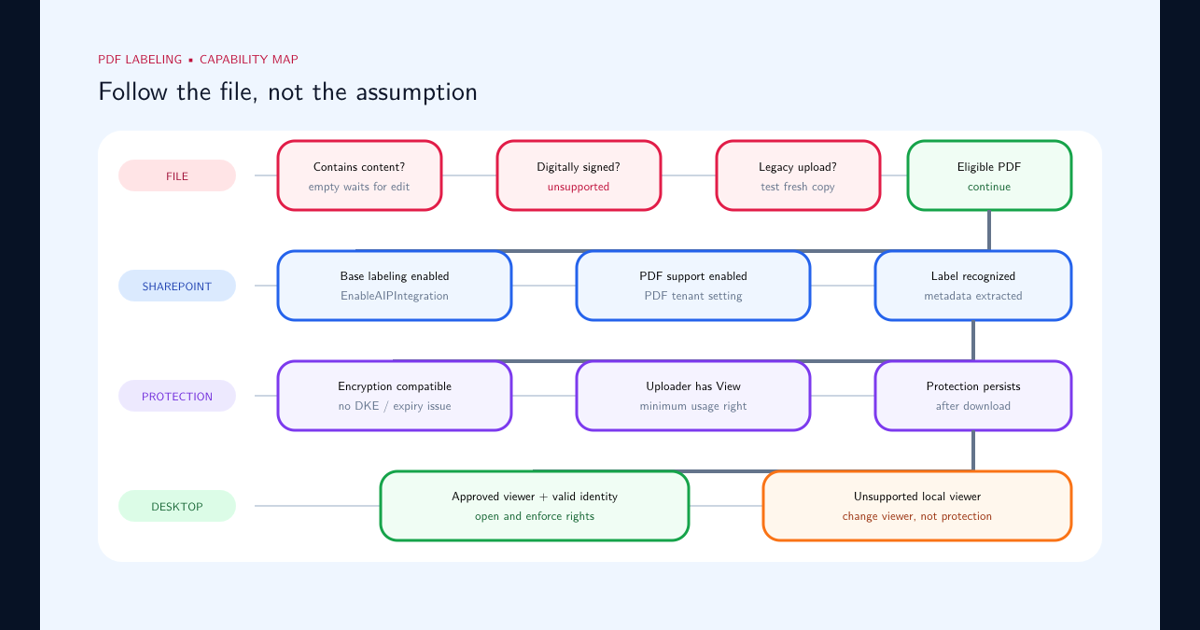
When sensitivity-label processing for SharePoint and OneDrive is enabled, supported Office and PDF files using compatible cloud-based encryption can be recognized and processed by Microsoft 365 services.
That service-side understanding matters because business workflows increasingly depend on more than merely storing a file.
They depend on:
- Browser-based opening.
- Office for the web.
- Search.
- Data Loss Prevention.
- eDiscovery.
- Content processing.
- Coauthoring.
- AutoSave.
- Microsoft 365 integrations.
- Security and compliance analysis.
Encryption should therefore be tested from the actual storage location rather than only by encrypting a local Word document on an administrator’s desktop.
Recommended SharePoint and OneDrive test
- Upload an unencrypted test document.
- Apply the intended sensitivity label.
- Open the file in Office for the web.
- Open it in the desktop application.
- Download it.
- Reopen the downloaded copy.
- Share it with another internal user.
- Share it with an approved guest where external collaboration is intended.
- Search for the document.
- Confirm DLP and compliance visibility.
- Test relabeling.
- Test removing or changing protection using the intended authorized role.
- Repeat using representative applications and devices.
A successful local encryption test proves only that encryption works.
It does not prove that the Microsoft 365 workflow still works.
Treat Coauthoring and AutoSave as Explicit Test Cases
Encryption can affect one of the most common Microsoft 365 working patterns: several people editing the same document.
Microsoft provides tenant capabilities for coauthoring on supported Office files protected with sensitivity-label encryption, but enabling this functionality has prerequisites, metadata implications, application-version requirements, and documented limitations.
Do not assume that because two users can independently open an encrypted file they can also coauthor it safely.
Include the following in the pilot:
| Test | Expected outcome |
|---|---|
| Two internal users open the same encrypted Word document | Both can access according to the intended rights |
| Both edit simultaneously | Coauthoring works if the encryption configuration supports it |
| AutoSave | Works in the selected supported configuration |
| User changes the sensitivity label | Label metadata remains consistent |
| Older Office client opens the document | Behavior is understood and supported |
| Office for the web opens the document | Browser workflow remains usable |
| Mobile application opens the document | Required mobile scenario works |
| User-defined permissions are used | Coauthoring behavior is validated separately |
Pay particular attention to encryption configurations that are intentionally more restrictive.
Coauthoring and AutoSave can be unavailable when a label uses incompatible expiration settings. Double Key Encryption also introduces different limitations and should be treated as a specialized architecture rather than a normal replacement for standard cloud-based Rights Management encryption.
Tenant-level coauthoring configuration should itself be change controlled. It affects sensitivity-label metadata behavior across the environment and should not be enabled casually without validating applications and operational tooling.
Test External Collaboration Before Assuming It Is Supported
External collaboration is one of the most common areas where encryption designs fail operationally.
Sending a protected document to an external user and successfully delivering the email does not prove that the recipient can open the attachment.
Rights Management authorization depends on identity and authentication.
Test each external collaboration model that the organization intends to support.
External-access checklist
- Recipient can receive the file.
- Recipient understands which identity must be used.
- Recipient can authenticate.
- Microsoft Entra cross-tenant settings permit the scenario.
- Conditional Access permits the scenario.
- Recipient client supports the protection.
- Recipient receives the intended usage rights.
- Recipient can reopen the content later.
- Offline behavior matches the business requirement.
- Expiration behaves as intended.
- Forwarding behavior is understood.
- Access after a guest-account change is understood.
- Support has a documented troubleshooting path.
Perform tests with actual partner scenarios rather than another account in the same tenant.
Internal test identities often bypass the exact federation, guest-access, cross-tenant, and authentication conditions that make external collaboration difficult.
Build Recovery Before You Need Recovery
Persistent protection requires a persistent recovery strategy.
Employee departure, account deletion, incorrect permissions, label configuration errors, investigations, litigation, and incident response can all create legitimate situations where authorized administrators need to access encrypted content.
Microsoft Rights Management supports a super-user capability that can provide authorized people and services with the ability to inspect and recover protected organizational content.
The important point is operational rather than technical:
Do not merely enable a recovery capability. Test the recovery procedure.
A production recovery runbook should identify:
- Who can authorize recovery.
- Who holds the required administrative role.
- Whether privileged access is permanent or just-in-time.
- How recovery activity is logged.
- How a protected file is located.
- How access is regained.
- How encryption can be removed or replaced where required.
- How the original protection is restored after an investigation.
- What evidence is retained from the recovery activity.
- Who is contacted if the normal recovery process fails.
Run a controlled test with an encrypted file whose original owner is unavailable.
If the security team cannot reliably recover that test document, automated encryption is not ready for broad enforcement.
Treat Changes to Existing Labels as a Migration
A common deployment approach is to introduce sensitivity labels first and add encryption later after the organization becomes comfortable with classification.
This can be a sensible strategy, but administrators should not assume that changing the label configuration instantly updates every historical item in exactly the same way.
Existing-content behavior depends on the workload and how the item is subsequently accessed.
For supported files in SharePoint and OneDrive, when sensitivity-label processing is enabled, the encryption state can change when files are subsequently accessed through supported flows.
Other items already carrying the label can retain their previous protection state until the label is removed and reapplied.
This means a production label can temporarily represent two states:
- Older content carrying the label without the new encryption.
- New or subsequently processed content carrying the same label with encryption.
Before changing an established label:
- Inventory where the label is currently used.
- Estimate the volume of previously labeled content.
- Identify business-critical repositories.
- Determine how existing files will transition.
- Test historical documents.
- Test documents with existing Rights Management protection.
- Test relabeling and downgrade behavior.
- Document the expected migration period.
- Communicate the change to support and data owners.
- Monitor access failures after rollout.
Editing an existing sensitivity label to add encryption should therefore be governed as a production security change, not as a cosmetic label update.
Separate Auto-Labeling Confidence From Encryption Enforcement
Service-side auto-labeling makes it possible to apply sensitivity labels to supported Microsoft 365 content at scale without requiring a user to select the label.
That is powerful when the label only classifies information.
It becomes significantly more consequential when the same label also encrypts the content.
The key principle is:
Do not use encryption to test whether your auto-labeling detection logic is accurate.
Auto-labeling policies should first run in simulation.
Simulation provides an opportunity to understand which items would receive the label before the policy changes those items in production.
Auto-labeling readiness sequence
| Stage | Objective |
|---|---|
| 1. Define | Identify the exact information-handling requirement |
| 2. Detect | Build conditions using appropriate classifiers or information types |
| 3. Simulate | Discover which real items would match |
| 4. Validate | Review true positives, false positives, and missed scenarios |
| 5. Pilot label | Apply classification to a controlled population |
| 6. Test access | Validate the intended encryption permissions |
| 7. Test services | Validate SharePoint, Office, DLP, discovery, and applications |
| 8. Test recovery | Confirm administrators can recover protected content |
| 9. Encrypt pilot | Introduce encryption to a limited production scope |
| 10. Expand | Increase scope only after operational evidence supports it |
Review individual simulation matches rather than looking only at percentages.
For every automatically encrypted classification, ask:
- What evidence caused this item to match?
- Would the business owner agree that the content requires encryption?
- Could a template or generic wording cause unrelated documents to match?
- Does the rule identify context or merely a word?
- How many files could be affected if the detection logic is wrong?
- Which users will retain access?
- What process exists to reverse an incorrect classification?
- Will an incorrect classification prevent the classifier from inspecting the content again after encryption?
A 1% false-positive rate can sound small.
Against 500,000 files, it represents 5,000 incorrectly classified items.
If the resulting label automatically applies encryption, those 5,000 classification errors can become 5,000 access-control events.
Use Trainable Classifiers for Meaning, but Understand the Encryption Boundary
Trainable classifiers are useful when content cannot be reliably identified using simple patterns.
A sensitive information type is well suited to recognizable structured information such as account numbers, identifiers, or other defined patterns.
A trainable classifier is better suited to categories whose sensitivity comes from meaning.
Examples can include:
- Merger and acquisition material.
- Strategic business plans.
- Intellectual property.
- Design documentation.
- Legal documents.
- Pricing information.
- Financial planning material.
- Organization-specific proprietary document types.
Microsoft provides pretrained classifiers and also allows organizations to build custom trainable classifiers using positive and negative examples.
The critical encryption limitation
Trainable classifiers work only with items that are not encrypted.
This has major architectural implications.
If an unencrypted document is successfully identified by a classifier and an auto-labeling policy then applies an encrypting sensitivity label, that document can become unavailable for subsequent classifier-based content inspection while it remains encrypted.
Classification and encryption therefore form a pipeline:
Readable content → classifier evaluates content → policy makes classification decision → label is applied → encryption restricts future content inspection
The encryption step should come after sufficient classification confidence has already been established.
Do not design a policy architecture that assumes a trainable classifier will continuously reevaluate content after that content has become encrypted.
Validate Trainable Classifier Quality Before Connecting It to Encryption
Machine-learning classification should not be treated as inherently correct because it is more sophisticated than keyword matching.
A custom trainable classifier learns from examples.
Its quality therefore depends heavily on the quality and diversity of those examples.
Use both positive and negative samples that reflect real organizational content.
Positive samples
Positive examples should represent documents that genuinely belong to the intended category.
They should include variation in:
- Authors.
- Business units.
- Document length.
- Templates.
- Formatting.
- Terminology.
- Project names.
- Historical and current examples.
Negative samples
Negative examples are equally important.
Include documents that look similar but should not receive the protected classification.
For example, a classifier intended to recognize merger-and-acquisition documents should be tested against:
- Generic strategy documents.
- Press releases.
- Sales proposals.
- Ordinary contracts.
- Board presentations unrelated to transactions.
- Market research.
- Public acquisition news.
- Templates containing similar terminology.
Review:
| Measurement | Security question |
|---|---|
| True positives | Are the intended sensitive documents found? |
| False positives | Will ordinary documents be encrypted incorrectly? |
| False negatives | Will genuinely sensitive documents remain unprotected? |
| Boundary cases | Does the classifier understand similar but non-sensitive material? |
| Department variation | Does performance remain consistent across teams? |
| Template variation | Is it learning the document category rather than one template? |
For an encrypting outcome, false positives deserve special attention because they directly create unnecessary access restrictions.
Custom classifiers should therefore be validated against a representative holdout set before their output is allowed to trigger automatic encryption.
Design for the Trainable Classifier Lifecycle
Trainable classifiers also require lifecycle planning.
Microsoft-provided pretrained classifiers can be evaluated against organizational content without building a custom model.
When the available pretrained classifiers do not accurately represent the organization’s information, a custom trainable classifier can be created.
A custom classifier requires representative positive and negative examples and should be tested before publication.
An important operational consideration is that published custom classifiers are not simply retrained in place as an ordinary continuous-learning model.
If a published custom classifier needs material accuracy improvement, the organization might need to replace it with a newly trained classifier based on improved sample sets.
This means the surrounding policy architecture should not become unnecessarily dependent on a classifier that nobody owns.
Maintain a classifier register containing:
| Field | Example |
|---|---|
| Classifier | M&A Transaction Documents |
| Business owner | Corporate Development |
| Security owner | Information Protection |
| Purpose | Identify active transaction documentation |
| Positive samples | Confirmed transaction documents |
| Negative samples | General strategy and public market documents |
| Accuracy review | Quarterly |
| Used by | Sensitivity auto-labeling |
| Resulting label | Highly Confidential - Transactions |
| Encryption applied | Yes |
| Recovery owner | Information Protection Operations |
| Revalidation trigger | Major document-template or business-process change |
If the classifier ultimately causes encryption, its ownership should be treated with the same seriousness as ownership of an access-control rule.
Test What Happens When Content Is Already Encrypted
Not every document that receives a new sensitivity label starts unprotected.
Content might already be encrypted because of:
- Another sensitivity label.
- User-defined permissions.
- Restricted Access functionality.
- A Rights Management template.
- A mail-flow rule.
- A DLP policy.
- A previous protection process.
Applying a new label can replace, retain, or remove existing encryption depending on the previous protection and the new label configuration.
The user applying the label must also have sufficient Rights Management rights to change or remove some forms of existing protection.
This creates a potential operational problem:
A label policy can appear logically correct while users still cannot apply it because they do not have permission to replace the protection already on the item.
Include previously encrypted documents in testing.
Test:
- Unencrypted document → encrypting label.
- Encrypted document → stronger encrypting label.
- Encrypted document → weaker encrypting label.
- Encrypted document → non-encrypting label.
- User-defined protection → administrator-defined protection.
- Administrator-defined protection → user-defined protection.
- Protected email with attachments.
- Relabeling performed by a recipient rather than the original owner.
- Recovery performed by an authorized administrator.
Protection transitions should be documented rather than discovered through production support incidents.
Build an Application Compatibility Inventory
Documents are often consumed by more software than the Office application in which they were created.
Before encrypting a high-volume sensitivity label, identify every important system that reads, modifies, converts, exports, indexes, scans, signs, archives, or transfers the affected documents.
Examples include:
- Document-generation systems.
- Contract-management platforms.
- Electronic-signature tools.
- Records-management solutions.
- PDF processors.
- Finance systems.
- Legal matter systems.
- CRM platforms.
- Data-ingestion pipelines.
- Backup and archive tooling.
- Security scanning tools.
- Migration tools.
- Desktop automation.
- Robotic Process Automation.
- Third-party Office integrations.
Create a simple compatibility matrix:
| Application | Reads encrypted file | Writes without losing label | Maintains encryption | Business critical | Tested |
|---|---|---|---|---|---|
| Microsoft Word desktop | Yes | Verify | Verify | Yes | Required |
| Office for the web | Yes | Verify | Verify | Yes | Required |
| Contract platform | Unknown | Unknown | Unknown | Yes | Required |
| PDF conversion workflow | Unknown | Unknown | Unknown | Medium | Required |
| Archive system | Unknown | N/A | Unknown | Yes | Required |
Treat every Unknown for a business-critical application as a deployment blocker until it has been resolved or the workflow has an approved alternative.
Encryption failures often appear outside the security team because the first broken component is an application that silently expected readable files.
Understand Offline Access and Expiration Before Restricting Them
Sensitivity-label encryption can control more than who may access information.
It can also affect how long protected content remains available and whether users can work without reconnecting to the Rights Management service.
These settings should be driven by business requirements rather than by the assumption that stricter always means safer.
Questions to answer
- Do traveling employees need access without internet connectivity?
- Do field workers operate in disconnected environments?
- Do executives open protected material while traveling?
- Must external partners retain temporary access?
- Should a document stop opening after a transaction closes?
- Will long-term records still need to be readable years later?
- Does the chosen configuration affect coauthoring or AutoSave?
- What happens during a Microsoft 365 or identity outage?
Restricting offline access forces users to periodically reauthenticate, which can improve control and produce additional access validation.
It can also make legitimate workflows dependent on network availability.
Similarly, content expiration can be appropriate for time-bound collaboration but dangerous for records that need long-term availability.
Apply these settings only when their security value is greater than the operational dependency they introduce.
Verify DLP, Search, Discovery, and Security Processing
Encryption should not be deployed without understanding how protected content remains visible to the organization’s security and compliance controls.
This requires more nuance than saying that encrypted content is either searchable or unsearchable.
Microsoft 365 processing depends on the encryption method, how sensitivity-label support is configured, the workload, the file type, and the path by which the file became protected.
In supported SharePoint and OneDrive scenarios, enabling service-side sensitivity-label processing allows Microsoft 365 to understand compatible labeled and encrypted files and support capabilities that would otherwise be impaired.
But not every encryption scenario behaves identically.
Validate the exact architecture rather than extrapolating from one test file.
Security-processing test cases
- Search can find the protected document where required.
- DLP can evaluate the intended conditions.
- eDiscovery can locate and process the content as required.
- Content Explorer behavior is understood.
- Audit events are generated.
- Security investigators have appropriate authorized access.
- Records and retention workflows behave as expected.
- Third-party discovery tooling is tested if it is relied upon.
- Trainable-classifier limitations are understood.
- Recovery access is available when deeper inspection is required.
Encryption should strengthen confidentiality without silently creating compliance blind spots.
Use a Staged Encryption Deployment
Encryption should normally be introduced progressively.
A practical deployment sequence is:
Phase 1 — Classification only
Publish the label without encryption.
Confirm:
- Users understand the classification.
- The label is selected appropriately.
- Automatic detection produces acceptable results.
- Business owners agree with the scope.
Phase 2 — Simulation
Configure auto-labeling logic but keep it in simulation.
Review:
- True positives.
- False positives.
- High-volume repositories.
- Unexpected document categories.
- Potential access impact.
Phase 3 — Controlled encryption pilot
Add encryption for a limited user group, site, business process, or dedicated test label.
Test:
- Internal access.
- External collaboration.
- Coauthoring.
- Office desktop.
- Office for the web.
- Mobile.
- DLP.
- Search.
- eDiscovery.
- Recovery.
- Business applications.
Phase 4 — Limited production enforcement
Expand to selected production repositories and monitor support tickets, access failures, overrides, relabeling, and recovery events.
Phase 5 — Broad enforcement
Only after the previous phases show acceptable behavior should the label become a broad automatic encryption control.
| Stage | Classification | Encryption | Scope |
|---|---|---|---|
| 1 | Enabled | No | Pilot users |
| 2 | Simulated automatically | No | Representative production data |
| 3 | Enabled | Yes | Controlled pilot |
| 4 | Enabled / automatic | Yes | Limited production |
| 5 | Enabled / automatic | Yes | Approved broad scope |
This progression provides multiple opportunities to identify mistakes before those mistakes affect large quantities of protected information.
Use a Formal Go / No-Go Checklist
Before an encrypting sensitivity label is automatically enforced across a broad production scope, require an explicit readiness decision.
Classification readiness
- Label definition has a documented business owner.
- Users understand when the classification applies.
- Auto-labeling conditions have been simulated.
- Representative true positives were manually reviewed.
- Representative false positives were reviewed.
- Detection thresholds are documented.
- Trainable classifiers have been validated against organizational content.
- Classifier limitations for encrypted content are understood.
Identity and permission readiness
- Rights Management prerequisites are configured.
- Administrator-defined versus user-defined permissions have been deliberately selected.
- Group membership has been validated.
- Conditional Access has been tested.
- Cross-tenant access has been tested.
- External users have been tested where relevant.
- Offline access requirements are documented.
- Expiration requirements are documented.
Application readiness
- Supported Office desktop applications have been tested.
- Office for the web has been tested.
- Mobile scenarios have been tested.
- Coauthoring has been tested.
- AutoSave has been tested.
- Critical third-party applications have been tested.
- Conversion and export processes have been tested.
Microsoft 365 service readiness
- SharePoint and OneDrive sensitivity-label processing is configured as required.
- Search behavior has been tested.
- DLP behavior has been tested.
- eDiscovery behavior has been tested.
- Retention and records dependencies are understood.
- Automation dependencies are understood.
Operational readiness
- Recovery process has been tested.
- Authorized recovery roles are documented.
- Support documentation exists.
- Help desk has a known escalation path.
- Access-denied telemetry can be investigated.
- Rollback or relabeling procedure is documented.
- Existing labeled content migration behavior is understood.
- Pilot acceptance criteria have been met.
If a critical item remains unknown, the correct status is not ready, not “enable it and see what happens.”
A Practical Encryption Best-Practice Baseline
A defensible encryption deployment for Microsoft Purview sensitivity labels follows several operating principles.
Classify before you encrypt. Make sure the organization understands which information belongs in the classification before adding persistent access controls.
Treat automatic encryption as a high-impact automation. A false positive should be evaluated as a potential access incident, not merely a labeling-quality issue.
Use simulation. Auto-labeling should demonstrate acceptable behavior against representative production content before enforcement.
Validate trainable classifiers before connecting them to encryption. Trainable classifiers are valuable for semantic categories such as strategic, legal, financial, or proprietary documents, but their predictions still require validation.
Remember the classifier encryption boundary. Trainable classifiers work only with unencrypted items. Design the workflow so classification occurs while content remains inspectable.
Prefer predictable permissions for predictable classifications. Use administrator-defined groups where a classification has a stable authorized audience. Use user-defined permissions where variable collaboration is genuinely required.
Test Microsoft 365 service processing. SharePoint, OneDrive, search, DLP, eDiscovery, Office for the web, and coauthoring should be explicit test scenarios.
Test external users using real external identities. Cross-tenant access and Conditional Access can change the result even when Rights Management permissions appear correct.
Build recovery first. Security teams must be able to recover protected organizational information when ownership, permissions, or investigations require it.
Inventory business applications. Every system that consumes the affected files needs an understood compatibility state.
Treat label changes as migrations. Adding encryption to an existing production label can affect historical and newly labeled content differently.
Separate pilot stages. Classification pilot, auto-labeling simulation, encryption pilot, and broad enforcement should be distinct deployment decisions.
The target state is not simply that the most sensitive label has encryption enabled.
The target state is that encryption is applied only when classification confidence is high, the correct users retain access, Microsoft 365 security and compliance services continue to function, critical applications remain operational, external collaboration behaves predictably, and the organization can recover protected information when something goes wrong.
Frequently asked questions
What should be checked before adding encryption to a sensitivity label?
Validate identity and Rights Management prerequisites, authorized users and groups, external collaboration, Office and application compatibility, SharePoint and OneDrive processing, coauthoring, offline access, existing encrypted content, recovery procedures, automation behavior, and the business workflows that will consume the protected information. Encryption should be piloted against real workflows before broad enforcement.
Is it safe to automatically apply an encrypting sensitivity label?
It can be, but the risk is materially higher than automatically applying a classification-only label. A false positive can become an access-control event. Auto-labeling should therefore run in simulation first, detection accuracy should be reviewed with business owners, permissions should be predictable, and recovery procedures should be tested before encryption is automatically applied at scale.
Can trainable classifiers inspect encrypted files?
No. Microsoft states that trainable classifiers work only with items that are not encrypted. This creates an important sequencing requirement: content must be readable when classification is performed, and organizations should understand how encrypting content affects future classifier-based detection and policy processing.
Does sensitivity-label encryption affect coauthoring?
It can. Coauthoring for encrypted Office documents requires supported Microsoft 365 configuration, applications, metadata behavior, and encryption settings. Some configurations, including certain expiration settings and Double Key Encryption scenarios, do not support normal coauthoring and AutoSave behavior.
What is the main risk when encrypted documents are shared externally?
A recipient may receive the file but still be unable to authenticate or obtain the required usage rights. Cross-tenant access policies, Conditional Access, identity configuration, client support, permission design, and the recipient organization all need to be considered before encrypted external collaboration is treated as a supported workflow.
How should organizations prepare for encrypted-content recovery?
Configure and test appropriate Rights Management recovery capabilities, including authorized super-user processes where required. Recovery should be operationally documented so that protected information does not become inaccessible when employees leave, permissions are misconfigured, or investigations and discovery processes require authorized access.
What happens if encryption is added later to an existing sensitivity label?
The result differs by location and access path. Files in SharePoint and OneDrive can have their encryption state updated when subsequently accessed if sensitivity-label processing is enabled, while other already-labeled items can retain their previous encryption state until they are relabeled. Treat changes to an existing production label as a migration rather than assuming every historical item immediately changes.
Should an encrypting label use administrator-defined or user-defined permissions?
Administrator-defined permissions are usually more predictable for standardized classifications. User-defined permissions can support dynamic collaboration but introduce additional variability, support requirements, and testing needs. Choose the model from the business workflow rather than from convenience during label creation.