Microsoft Purview Data Map and Data Sources: Architecture, Scanning, Classification, and Best Practices
Understand how Microsoft Purview Data Map discovers and organizes enterprise metadata, how data sources are registered and scanned, and how to build a reliable governance foundation across cloud, on-premises, SaaS, and multicloud data estates.
Microsoft Purview Data Map is the metadata foundation behind Microsoft Purview data governance.
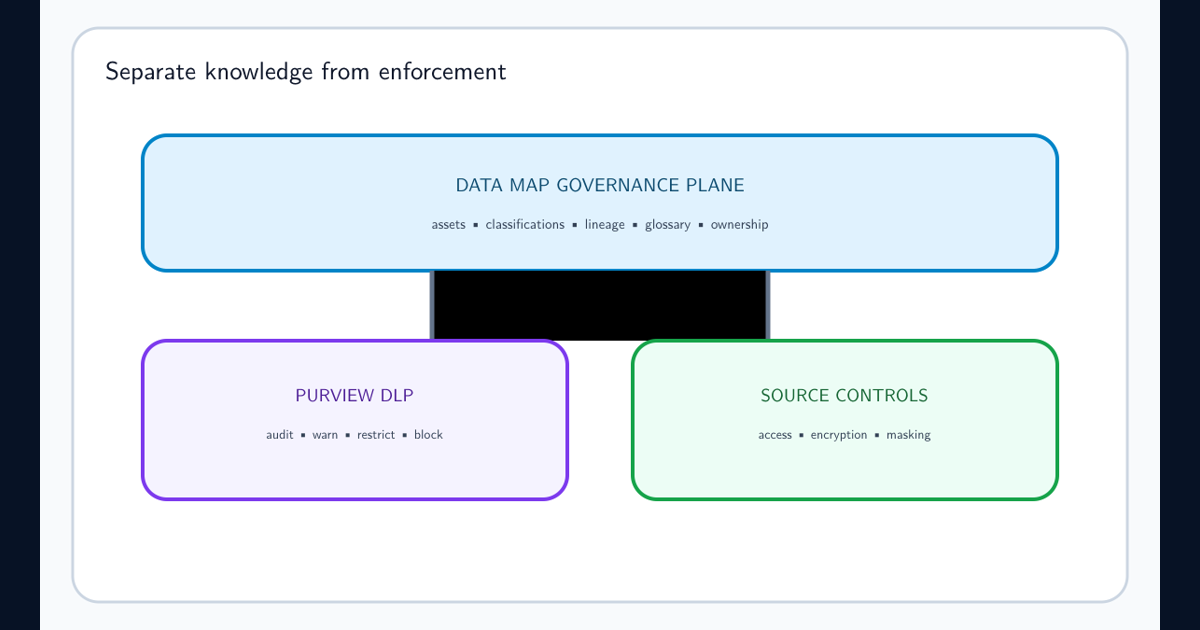
It is not a universal enforcement plane. The Data Map DLP limitations guide explains where metadata discovery and classification stop and where Purview DLP or source-native controls must begin.
Its purpose is to create and maintain an enterprise view of data assets across supported analytics platforms, databases, file systems, SaaS applications, cloud services, multicloud environments, and on-premises systems.
The Data Map does not become useful simply because Purview has been deployed.
It needs to be populated.
The normal operating model is:
- Identify the data estate.
- Register supported data sources.
- Place those sources into appropriate domains and collections.
- Configure authentication and network connectivity.
- Create scans.
- Discover technical metadata.
- Apply supported classifications.
- Ingest lineage and relationships where available.
- Curate ownership and business context.
- Keep the metadata current through recurring scans and monitoring.
The resulting metadata can then support downstream governance experiences such as Unified Catalog, data products, data quality, discovery, stewardship, and broader data-management processes.
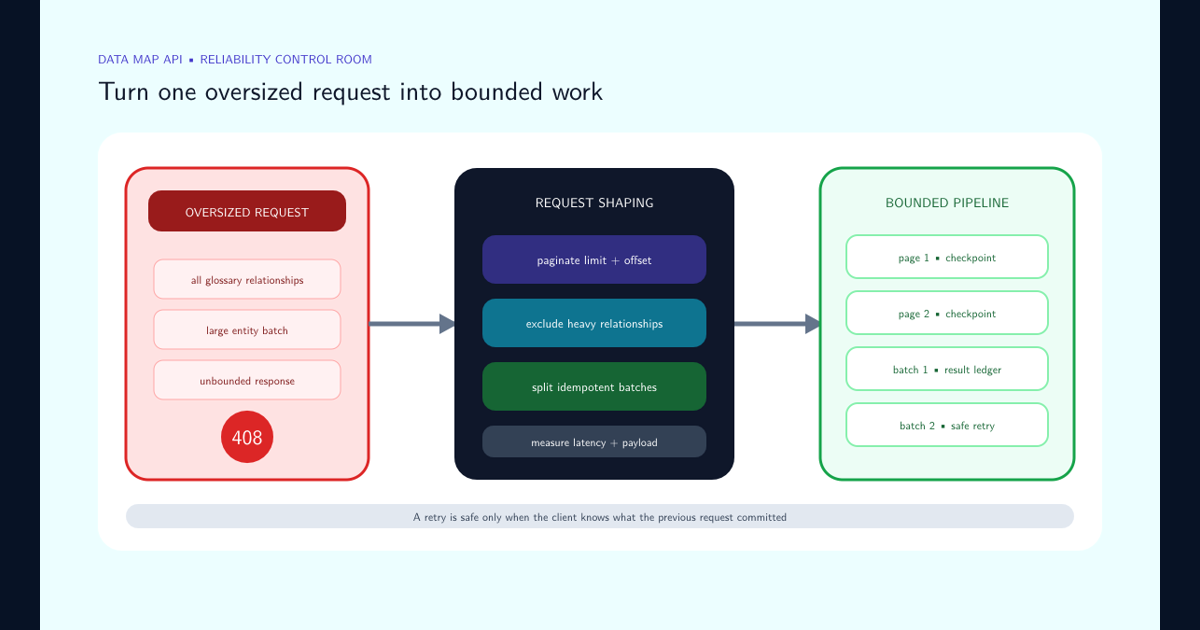
When an integration that populates or extracts the map returns HTTP 408, use the Data Map API timeout guide to reduce relationship expansion, paginate glossary reads, split idempotent writes, and separate request latency from capacity pressure.
The most important architectural principle is that Data Map quality is determined by source coverage and metadata quality, not by the number of connectors configured.
Understand the Difference Between Data Map and Unified Catalog
Data Map and Unified Catalog are closely related, but they should not be treated as the same component.
Data Map is the metadata foundation.
It discovers, receives, organizes, and stores metadata describing the organization’s data estate.
Unified Catalog is the governance and discovery experience built on top of that metadata.
A simplified model is:
| Layer | Primary responsibility |
|---|---|
| Data sources | Systems where operational data physically exists |
| Data Map | Metadata discovery, scanning, classification, relationships, and technical context |
| Unified Catalog | Search, curation, governance context, data products, stewardship, and data consumption |
| Governance processes | Ownership, data quality, policy, access, lifecycle, and remediation |
Scanning a database successfully does not automatically make its contents business-ready.
A table called dbo.CUST_MSTR_01 may be technically discoverable while still being meaningless to most employees.
Governance adds the missing context:
- Business name.
- Description.
- Data owner.
- Data steward.
- Governance domain.
- Data product.
- Criticality.
- Classification.
- Quality expectations.
- Lineage.
- Usage guidance.
A mature implementation therefore connects technical discovery with business curation instead of assuming one can replace the other.
Start With a Data Source Inventory
Do not begin by registering every source an administrator can find.
First identify the data estate and decide which systems matter to governance.
Create an inventory containing at least:
| Field | Example |
|---|---|
| Source | Production Azure SQL |
| Platform | Azure SQL Database |
| Environment | Production |
| Business owner | Finance |
| Technical owner | Data Platform |
| Geography | West Europe |
| Data criticality | High |
| Sensitive data expected | Yes |
| Authentication owner | Cloud Platform |
| Network path | Private network |
| Scan priority | Tier 1 |
| Lineage required | Yes |
| Governance domain | Finance |
| Scan frequency | Daily |
Categorize sources by importance.
A useful starting model is:
Tier 1 — Critical sources
Systems containing authoritative, regulated, highly sensitive, or business-critical information.
These should receive the strongest ownership, scan monitoring, classification validation, and lineage attention.
Tier 2 — Important operational sources
Systems widely used by the business but with lower regulatory or criticality requirements.
These still need reliable discovery but may tolerate less aggressive scanning.
Tier 3 — Low-priority or archival sources
Historical, low-change, development, test, or low-value systems.
These can often use lower scan frequencies or delayed onboarding.
Prioritization prevents the implementation team from spending months scanning low-value systems while critical production data remains unmapped.
Registration Is Not the Same as Discovery
Registering a data source creates its presence in the Data Map hierarchy.
Registration answers questions such as:
- What is this source?
- Where does it belong?
- Which governance domain owns it?
- Which collection should contain it?
- Which administrators should manage it?
Registration does not mean that Microsoft Purview has successfully inspected the contents of that source.
A source can therefore exist in several operational states:
| State | Meaning |
|---|---|
| Inventoried | Organization knows the source exists |
| Registered | Source exists in Data Map |
| Connected | Authentication and network prerequisites work |
| Scanned | Metadata discovery has executed |
| Ingested | Discovered metadata has entered Data Map |
| Classified | Supported classification rules have evaluated the data |
| Curated | Business metadata and ownership have been added |
| Governed | Asset participates in active governance processes |
This distinction is important when reporting coverage.
Saying that 95% of databases are “registered” can sound impressive while only 30% have successful recurring scans.
Governance metrics should therefore separate source registration from successful metadata population.
Validate Capabilities Per Connector
Microsoft Purview supports many different data-source technologies, but connector capabilities are not identical.
A connector might support technical metadata while another also supports:
- Data classification.
- Schema extraction.
- Lineage.
- Incremental scanning.
- Specific authentication methods.
- Private connectivity.
- Particular file formats.
- Data quality integration.
- Hierarchical source registration.
Never create an architecture diagram that labels a source simply as “Purview supported” without specifying which required capability is supported.
Maintain a connector matrix.
| Source | Metadata | Classification | Lineage | Incremental scan | Network model | Status |
|---|---|---|---|---|---|---|
| Azure SQL Database | Verify | Verify | Verify | Verify | Public / private as designed | Approved |
| Azure Data Lake Storage | Verify | Verify | Scenario dependent | Verify | Public / private as designed | Approved |
| Fabric / Power BI | Verify | Scenario dependent | Verify | Verify | Service integration | Approved |
| On-premises SQL | Verify | Verify | Verify | Verify | Integration runtime | Pilot |
| SaaS platform | Connector dependent | Connector dependent | Connector dependent | Connector dependent | Vendor dependent | Review |
The repeated word Verify is intentional.
Connector support changes over time, and capabilities can have prerequisites or limitations.
Validate the required capability against the current connector documentation during implementation instead of relying on a generic supported-source list.
Design Domains and Collections Before Registering at Scale
Large organizations can have thousands of data sources owned by different teams.
Data Map uses governance domains and collections to help organize this estate and establish administrative boundaries.
These structures should be designed before large-scale registration.
A weak structure often mirrors technical infrastructure without considering ownership.
For example:
Root
├── Subscription-01
├── Subscription-02
├── Subscription-03
└── Subscription-04
This might be convenient for the cloud platform team but provide little governance meaning.
A more sustainable design can reflect accountability:
Enterprise
├── Finance
│   ├── Production
│   └── Non-Production
├── Human Resources
│   ├── Production
│   └── Non-Production
├── Customer
│   ├── Analytics
│   └── Operational
└── Shared Data Platform
There is no universal hierarchy.
The correct model depends on:
- Governance ownership.
- Organizational structure.
- Data domains.
- Security boundaries.
- Platform administration.
- Regulatory separation.
- Geographic boundaries.
- Environment separation.
- Delegated scanning responsibilities.
Avoid overengineering the hierarchy.
Collections are governance and administration structures, not a replacement for every tag or business attribute an organization might want to represent.
Understand What a Scan Actually Does
Scanning is the process that connects Microsoft Purview to a registered source and retrieves supported metadata.
Depending on the connector and scan configuration, discovery can capture information such as:
- Databases.
- Schemas.
- Tables.
- Views.
- Columns.
- Files.
- Folders or containers.
- File types.
- Asset names.
- Technical properties.
- Relationships.
- Supported lineage.
- Classification results.
For structured sources, schema metadata is particularly important because column names and data characteristics can provide the basis for technical discovery and classification.
A simplified scan lifecycle is:
Connect → Enumerate → Inspect → Extract metadata → Classify → Ingest → Curate
The scan itself and the subsequent ingestion process should be considered separate operational phases.
A source connection can succeed while some discovered assets fail to ingest correctly.
Similarly, a scan can complete with exceptions rather than cleanly succeeding.
Administrators should therefore monitor the detailed scan status instead of treating any completed execution as successful metadata coverage.
Design Authentication and Network Connectivity as Production Dependencies
Scanning requires Microsoft Purview to authenticate to the source and reach it over the required network path.
These are production dependencies.
Do not treat credentials as an implementation detail owned by one engineer.
Common authentication patterns vary by connector and can include:
- Microsoft Purview managed identity.
- User-assigned managed identity.
- Service principal.
- Stored credentials.
- Database authentication.
- Supported service-specific authentication mechanisms.
Prefer managed identities where supported and operationally appropriate because they reduce the need to manage long-lived secrets.
Where secrets or passwords are required, establish:
- Secret ownership.
- Secure storage.
- Rotation process.
- Expiration monitoring.
- Least-privilege permissions.
- Emergency replacement procedure.
Network design also needs deliberate planning.
Sources may be:
- Publicly reachable.
- Protected by firewalls.
- Available through private endpoints.
- Located on-premises.
- Located in another cloud.
- Reachable only through an integration runtime.
Connectivity readiness checklist
- Source hostname or service endpoint is known.
- Required DNS resolution works.
- Authentication succeeds.
- Required firewall rules exist.
- Private endpoint architecture is tested where applicable.
- Integration runtime capacity is sufficient where required.
- Source permissions provide only required metadata and classification access.
- Credential expiration is monitored.
- Source owner knows Purview will scan the system.
- Scan windows account for source workload.
A source should not enter production scanning until both identity and network ownership are clear.
Scan Intentionally Instead of Scanning Everything
A technically available asset is not automatically a useful governance asset.
Broad, uncontrolled scanning can produce unnecessary metadata volume, classification noise, operational load, and a catalog full of development or temporary objects.
Define scan scope deliberately.
Consider excluding:
- Temporary schemas.
- Build artifacts.
- Transient staging locations.
- Backup directories.
- Development sandboxes.
- Generated files with no governance value.
- Technical schemas that users should not discover.
- Unsupported or irrelevant file types.
Conversely, ensure that critical areas are not excluded simply because they are large.
A useful scoping decision asks:
Will discovering this asset help someone govern, understand, secure, trace, assess, or use enterprise data?
If the answer is no, scanning it might create more noise than value.
Scope decisions should be documented because exclusions can create blind spots.
Maintain a record of intentionally unscanned source areas and the reason for exclusion.
Use Scan Rule Sets to Control Classification Scope
Scan rule sets determine important parts of how Purview evaluates a source during scanning.
They can influence which supported file types are considered and which data classifications are evaluated.
The default approach of enabling every possible classification is convenient during discovery but can generate unnecessary classification volume in a mature environment.
Consider a focused rule set where the organization has a defined governance objective.
For example, a healthcare analytics environment might prioritize classifications relevant to:
- Patient identifiers.
- Health-related data.
- Government identifiers.
- Contact information.
- Financial information.
A software engineering data platform might have a different classification focus.
Rule-set design principles
- Begin broad during initial discovery if the classification landscape is unknown.
- Review which classifications actually appear.
- Remove irrelevant rules when they create noise or unnecessary processing.
- Maintain organization-specific classifications where required.
- Test rule-set changes before applying them broadly.
- Document why custom classifications exist.
- Keep classification ownership separate from source ownership where appropriate.
Classification should provide meaningful context.
Thousands of low-value classification hits can make the governance experience less trustworthy rather than more informative.
Understand What Data Map Classification Means
Data Map scanning can automatically apply classifications when supported detection logic matches discovered data.
Microsoft Purview can classify supported structured and unstructured data types.
For structured systems, classifications are commonly associated with schema elements such as columns.
For supported files, classification can inspect applicable content according to the connector, rule set, file type, and scanning capabilities.
A classification indicates that Purview detected characteristics associated with a data category.
It does not automatically mean:
- The data is legally regulated.
- The business considers the asset confidential.
- The entire database has the same sensitivity.
- Access should automatically be removed.
- A security incident exists.
Treat classification as governance metadata that feeds a broader decision.
Combine it with:
- Source context.
- Business ownership.
- Environment.
- Data volume.
- Sensitivity labels where relevant.
- Regulatory requirements.
- Access model.
- Data product context.
- Lineage.
- Data quality.
Technical detection becomes more valuable when business context explains what the detection actually means.
Treat Lineage as a Separate Coverage Requirement
Data lineage describes how information moves and transforms through the data estate.
It can answer questions such as:
- Where did this table come from?
- Which pipeline created this dataset?
- Which downstream reports depend on this source?
- What will break if this column changes?
- Where does customer information flow after ingestion?
- Which data products ultimately depend on this source?
Data Map can receive lineage metadata from supported source scans and transformation integrations.
However, successful source scanning does not guarantee complete lineage.
Lineage support differs by platform and integration.
Track lineage coverage separately from scan coverage.
| Metric | Example |
|---|---|
| Tier-1 sources registered | 100% |
| Tier-1 sources successfully scanned | 96% |
| Tier-1 structured assets classified | 88% |
| Tier-1 transformation platforms with lineage | 72% |
| Critical data products with end-to-end lineage | 61% |
This makes governance gaps visible.
Reporting only that a source is present in Data Map can hide the fact that nobody can trace its downstream impact.
Match Scan Frequency to the Rate of Change
Data Map becomes stale when the source changes faster than Purview refreshes its metadata.
Avoid assigning the same scan schedule to every source.
Consider:
- How frequently schemas change.
- How often files are created.
- Whether assets are deleted frequently.
- How critical the metadata is.
- How quickly classifications need to appear.
- Source performance impact.
- Integration runtime capacity.
- Scan duration.
- Metadata volume.
- Incremental scanning support.
Example operating model:
| Source type | Example frequency |
|---|---|
| Critical production analytics platform | Daily or based on change rate |
| Rapidly changing data lake | Frequent incremental scanning where supported |
| Stable production database | Daily or several times per week |
| Low-change reference database | Weekly |
| Archive | Monthly or event-driven review |
| Development environment | Lower priority unless governance requires otherwise |
These are architectural examples rather than universal recommendations.
Scan frequency should be justified by the business need for current metadata.
A ten-hour scan running every hour does not create real-time governance.
Measure duration and completion reliability before increasing frequency.
Understand Full and Incremental Scanning
Where supported, incremental scanning can reduce unnecessary metadata extraction by focusing detailed processing on assets that are new or changed.
This can be particularly valuable for large, dynamic data estates.
A conceptual distinction is:
Full scan
Evaluates the configured source scope comprehensively.
Useful when:
- A source is first onboarded.
- Scan configuration changes significantly.
- Governance needs a complete refresh.
- Troubleshooting requires a baseline.
Incremental scan
Uses supported source and connector behavior to reduce detailed extraction of unchanged content.
Useful when:
- The source is large.
- Only part of the source changes regularly.
- Recurring scans need to complete efficiently.
Incremental does not mean the scan ignores the overall configured scope.
Administrators should understand how the connector reports discovered assets, changed assets, and ingested assets when interpreting scan metrics.
Do not compare full and incremental scan counts without understanding those differences.
Monitor Data Map Population as an Operational Service
Scan scheduling without monitoring creates false confidence.
Data Map provides monitoring capabilities that can show scan-run health and metadata-population status.
Important scan states include outcomes such as:
- Succeeded.
- Completed with exceptions.
- Failed.
- Canceled.
- In progress.
- Queued.
- Throttled.
Completed with exceptions deserves particular attention.
It means the end-to-end scan ran but some underlying discovery or ingestion activity encountered problems that may result in missing assets, classifications, lineage, or metadata.
Operational monitoring should track:
| Metric | Why it matters |
|---|---|
| Successful scan rate | Indicates source coverage reliability |
| Completed-with-exception rate | Identifies partially populated sources |
| Failed scans | Exposes broken credentials, networking, permissions, or connectors |
| Scan duration | Reveals capacity or source-performance issues |
| Assets discovered | Shows what the source enumeration found |
| Assets ingested | Shows what entered Data Map |
| Classification volume | Helps identify changes or detection anomalies |
| Queue time | Identifies integration runtime or concurrency pressure |
| Last successful scan | Indicates metadata freshness |
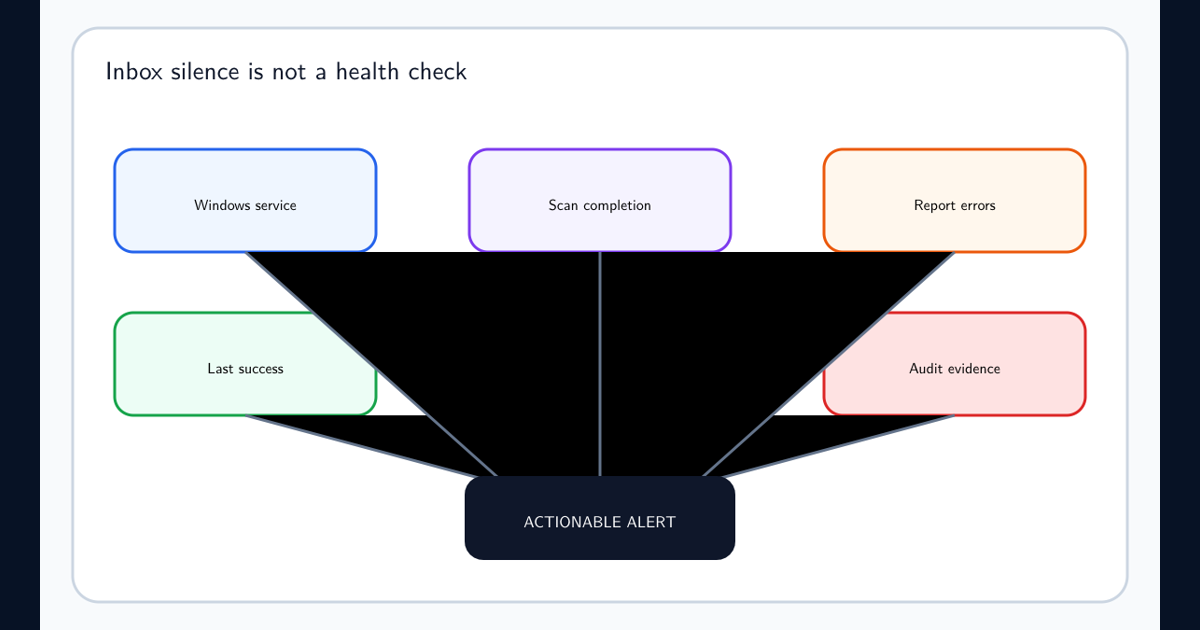
Set service-level expectations for important sources.
Example:
Tier-1 production sources must have a successful metadata refresh within the previous 24 hours.
This turns scanning into a measurable governance control rather than a background configuration nobody owns.
Measure the Quality of the Data Map Itself
Organizations often focus on data quality but ignore metadata quality.
A Data Map can contain millions of assets and still provide limited governance value if those assets are stale, duplicated, unowned, poorly classified, or disconnected from business context.
Define Data Map quality metrics.
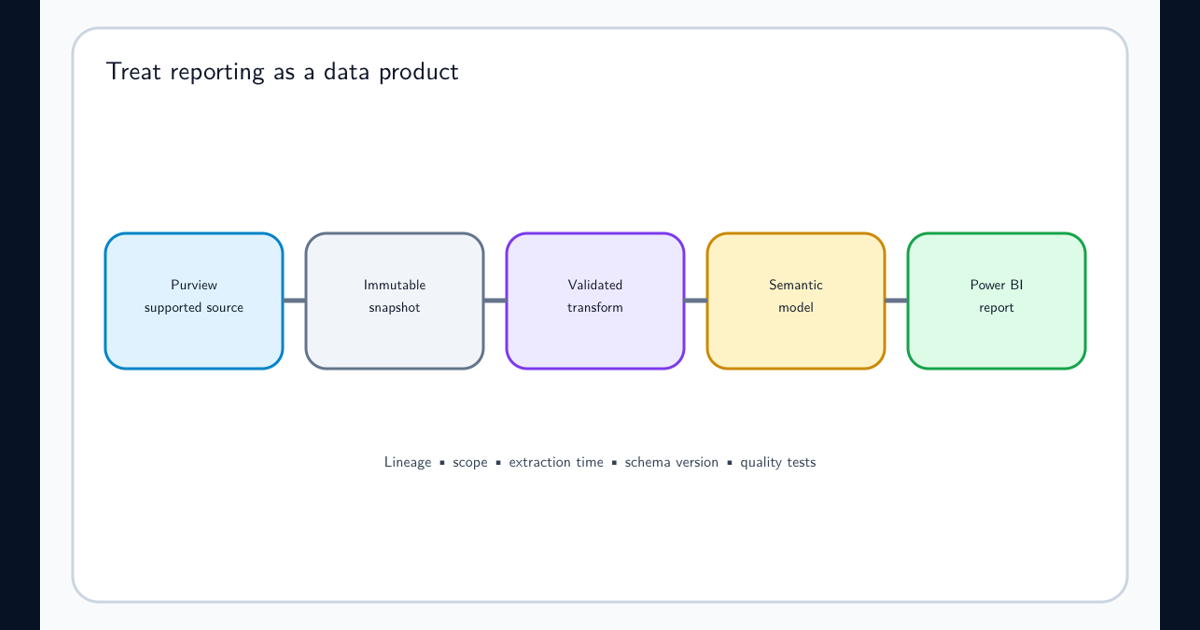
When these measures must be reused outside the portal, build a governed Power BI reporting pipeline that preserves collection scope, extraction time, API lineage, and data-quality checks instead of copying portal totals without their denominator.
Coverage
- Percentage of known Tier-1 sources registered.
- Percentage successfully scanned.
- Percentage with current metadata.
- Percentage with required lineage.
Classification
- Percentage of critical structured assets evaluated.
- Classification false-positive rate.
- Assets with unexpected sensitive-data detections.
- Sources using approved scan rule sets.
Ownership
- Percentage of critical assets with a business owner.
- Percentage with a steward.
- Percentage associated with a governance domain.
Freshness
- Average age of metadata.
- Critical sources outside scan SLA.
- Repeated scan failures.
- Sources with expired credentials.
Usability
- Assets with useful descriptions.
- Assets included in governed data products.
- Search success.
- Duplicate or obsolete assets.
- Assets with meaningful lineage.
A governance dashboard should therefore show more than the total asset count.
Total asset count is a scale metric.
It is not a trust metric.
Apply Least Privilege to Data Source Scanning
Purview scanners require sufficient access to discover supported metadata and, where configured, evaluate content for classification.
They should not automatically receive broad administrative access.
For each connector, determine the minimum privileges required for:
- Source enumeration.
- Metadata extraction.
- Schema discovery.
- Content sampling where required.
- Classification.
- Lineage.
- Incremental-change detection.
Then compare those permissions with the actual account configuration.
Security review
- Scanner identity is dedicated or clearly attributable.
- Permissions match connector requirements.
- Write access is not granted unless specifically required.
- Secrets are not embedded in scripts.
- Managed identity is preferred where practical.
- Authentication changes are auditable.
- Credential owners are documented.
- Cross-environment reuse is minimized.
- Production and non-production identities are separated where appropriate.
- Access is reviewed periodically.
Scanning should not create a new highly privileged identity merely for convenience.
Metadata governance should improve the organization’s security position rather than introducing an unmanaged credential with access to the entire data estate.
Use a Standard Data Source Onboarding Process
Treat every source as an onboarding workflow rather than an ad hoc connector configuration.
Step 1 — Qualify the source
Confirm:
- Business owner.
- Technical owner.
- Platform.
- Environment.
- Criticality.
- Expected sensitive information.
- Required governance outcome.
Step 2 — Validate connector support
Determine:
- Metadata capabilities.
- Classification support.
- Lineage support.
- Authentication methods.
- Network requirements.
- Supported file formats.
- Incremental scanning support.
Step 3 — Place the source correctly
Assign:
- Governance domain.
- Collection.
- Administrative ownership.
- Environment classification.
Step 4 — Configure connectivity
Validate:
- Identity.
- Permissions.
- Network route.
- DNS.
- Firewall.
- Integration runtime where required.
Step 5 — Create the scan
Define:
- Scan name.
- Scope.
- Credential.
- Rule set.
- Frequency.
Step 6 — Run the initial scan
Review:
- Discovered assets.
- Ingested assets.
- Exceptions.
- Classifications.
- Unexpected source areas.
Step 7 — Validate metadata quality
Business and technical owners should confirm that important assets are present and understandable.
Step 8 — Validate lineage
Where lineage is required, verify that the expected upstream and downstream relationships actually appear.
Step 9 — Curate
Add ownership, descriptions, governance-domain context, and data-product relationships.
Step 10 — Operationalize
Schedule scans, assign monitoring responsibility, and establish remediation for failures.
This standardization becomes increasingly important as onboarding responsibility is delegated across a large enterprise.
Assign Clear Ownership Across the Data Map
Data Map implementations fail when everybody assumes somebody else owns metadata quality.
Separate responsibilities clearly.
| Responsibility | Typical owner |
|---|---|
| Purview platform | Central data governance or platform team |
| Domain design | Enterprise governance |
| Collection administration | Delegated platform or domain administrators |
| Source ownership | Application or data platform owner |
| Credentials | Identity / platform / source team |
| Scan configuration | Data source administrator |
| Classification policy | Information governance / security |
| Business descriptions | Data steward |
| Business ownership | Data owner |
| Lineage validation | Data engineering |
| Scan monitoring | Purview operations |
| Metadata-quality review | Governance and domain stewards |
Avoid a model where the central Purview team becomes responsible for understanding every database in the enterprise.
The central team should establish:
- Platform standards.
- Security standards.
- Connector patterns.
- Monitoring.
- Governance architecture.
- Common classifications.
- Onboarding requirements.
Business domains and technical source owners should provide the local knowledge that the central platform cannot infer automatically.
Avoid the Most Common Data Map Failure Patterns
Several implementation patterns repeatedly reduce the usefulness of a Data Map.
Register everything, curate nothing
Millions of assets become searchable but nobody knows which ones matter.
Better: Prioritize authoritative and critical sources and add business ownership.
Scan once
Metadata immediately begins becoming stale.
Better: Establish recurring scanning and freshness targets.
Treat successful connection as successful governance
Authentication works, but classifications, metadata ingestion, or lineage remain incomplete.
Better: Validate scan results and ingestion.
Enable every classification forever
The catalog accumulates noisy, low-value detections.
Better: Tune rule sets based on governance objectives.
Organize only by cloud subscription
The hierarchy mirrors infrastructure but does not communicate accountability.
Better: Align domains and collections with meaningful governance boundaries.
Assume lineage comes automatically
Sources are scanned but critical transformations remain invisible.
Better: Track lineage as a separate implementation workstream.
Ignore source owners
Central administrators configure technical scans without knowing which schemas are authoritative or sensitive.
Better: Require source-owner validation during onboarding.
Ignore failed scans
The source remains visible in Purview, creating the impression that metadata is current.
Better: Monitor the age of the last successful scan.
Measure asset count as success
More metadata is interpreted as better governance.
Better: Measure coverage, freshness, ownership, classification accuracy, lineage, and usage.
Use a Data Source Production Readiness Checklist
Before a critical source is considered production-ready in Data Map, require an explicit review.
Governance readiness
- Business owner identified.
- Technical owner identified.
- Governance domain selected.
- Collection selected.
- Source criticality documented.
- Expected sensitive-data categories documented.
- Metadata freshness requirement defined.
Connector readiness
- Source connector is supported.
- Required metadata capabilities are confirmed.
- Classification capability is confirmed.
- Lineage capability is confirmed where required.
- Incremental scanning capability is understood.
- Required file formats are supported.
Security readiness
- Scanner identity created.
- Least-privilege permissions validated.
- Credential ownership documented.
- Secret rotation process exists where applicable.
- Network route works.
- Firewall rules are approved.
- Integration runtime is healthy where required.
Scan readiness
- Scan scope reviewed.
- Rule set reviewed.
- Initial scan completed.
- Exceptions investigated.
- Asset count validated by the source owner.
- Classifications reviewed.
- Scan frequency approved.
Governance-quality readiness
- Important assets are discoverable.
- Critical assets have meaningful names or descriptions.
- Ownership is represented.
- Required lineage appears.
- Data products can use the required assets.
- Metadata-quality issues have owners.
Operations readiness
- Scan monitoring owner assigned.
- Failure escalation exists.
- Credential expiration is monitored.
- Freshness SLA exists for critical sources.
- Source decommissioning process is documented.
A source should not be marked fully governed simply because its first scan succeeded.
A Practical Data Map Best-Practice Baseline
A defensible Microsoft Purview Data Map implementation follows several operating principles.
Inventory before registering. Understand which data sources exist, who owns them, and which ones matter most.
Prioritize critical data first. Governance value comes from covering authoritative and sensitive sources, not from maximizing connector count.
Separate registration from scan coverage. A registered source is not necessarily a populated or current source.
Design domains and collections intentionally. Use structures that support ownership, delegation, and governance rather than simply reproducing cloud infrastructure.
Validate connector capabilities individually. Metadata, classification, lineage, authentication, network, incremental scanning, and file support vary by source.
Use least privilege. Give scanner identities only the access required for the intended discovery capabilities.
Control scan scope. Exclude irrelevant temporary data while ensuring important production data remains visible.
Tune classification. Use scan rule sets to keep classification aligned with actual governance requirements.
Treat lineage separately. Measure whether critical data flows can actually be traced from source through transformations to consumption.
Match frequency to change rate. Scan often enough that important metadata remains useful without creating unnecessary source or infrastructure load.
Monitor every critical scan. Successful schedules do not guarantee successful metadata population.
Investigate completed-with-exceptions results. Partial discovery can create silent governance gaps.
Measure metadata freshness. Know when every important source was last successfully scanned.
Curate technical assets. Add ownership, descriptions, governance context, and data-product relationships so that assets become understandable to business users.
Measure trust, not volume. Asset count alone is not a governance success metric.
The target state is not simply a Data Map containing every technical object the organization owns.
The target state is a continuously maintained map of the important data estate where critical sources are discoverable, metadata is current, classifications are meaningful, lineage is understood, ownership is clear, and governance teams can trust the information they use to make decisions.
Frequently asked questions
What is Microsoft Purview Data Map?
Microsoft Purview Data Map is the metadata foundation for Microsoft Purview data governance. It captures technical and governance metadata about data assets across supported analytics, database, file, SaaS, cloud, multicloud, and on-premises systems and makes that metadata available to governance experiences such as Unified Catalog.
What is the difference between registering and scanning a data source?
Registration tells Microsoft Purview that a data source exists and places that source into the Data Map governance hierarchy. Scanning connects to the source and retrieves supported metadata, schema information, classifications, and in some scenarios lineage. Registration alone does not mean the source has been discovered in detail.
Does Microsoft Purview Data Map copy all source data into Purview?
No. Data Map is primarily a metadata system. Scanning discovers metadata about assets and may inspect supported data samples as required for classification, but the objective is to build a map of the data estate rather than replicate the complete contents of every connected system.
What kinds of data sources can be connected to Data Map?
Supported sources span Microsoft Azure, databases, file and object stores, analytics platforms, selected SaaS and application services, multicloud technologies, and supported on-premises systems. Capabilities differ by connector, so registration, scanning, classification, lineage, authentication, and file-format support should be verified for each source type.
What is a scan rule set?
A scan rule set determines important parts of scanning behavior, including supported file types and which classifications Purview evaluates for the source. Organizations can use supported system rule sets or create custom rule sets where more focused classification is required.
Why are domains and collections important in Data Map?
Domains and collections help organize a large data estate and provide administrative boundaries for sources, scans, credentials, rule sets, and governance responsibilities. The hierarchy should reflect meaningful ownership and operating boundaries rather than being created as an arbitrary folder structure.
Does scanning automatically provide complete end-to-end lineage?
No. Lineage support varies by source and integration. Some platforms can provide automatic lineage or transformation metadata, while others expose only technical asset metadata. Lineage coverage should be validated connector by connector rather than assumed from successful scanning.
How often should a data source be scanned?
Scan frequency should reflect how quickly the source changes, the importance of the metadata, operational cost, connector behavior, and governance requirements. Highly dynamic production sources may need frequent incremental scanning, while stable archival sources can often be scanned less frequently.