Microsoft Purview Data Loss Prevention: Policy Design, Deployment, and Best Practices
Design Microsoft Purview DLP policies that protect sensitive information across Microsoft 365, endpoints, browsers, and collaboration workflows without creating unnecessary disruption for users.
Microsoft Purview Data Loss Prevention should be designed around business risk, not around the goal of blocking as much activity as possible. DLP is most effective when the organization can explain what information it is protecting, where that information may legitimately travel, which activities represent meaningful risk, and what response is appropriate when those activities occur.
Purview DLP provides a policy framework for identifying, monitoring, and protecting sensitive information across supported Microsoft 365 services, endpoints, browsers, applications, and other data locations. Policies can use conditions such as sensitive information types, sensitivity labels, classifiers, users, groups, locations, activities, and contextual signals to determine whether an action should be audited, warned, restricted, or blocked.
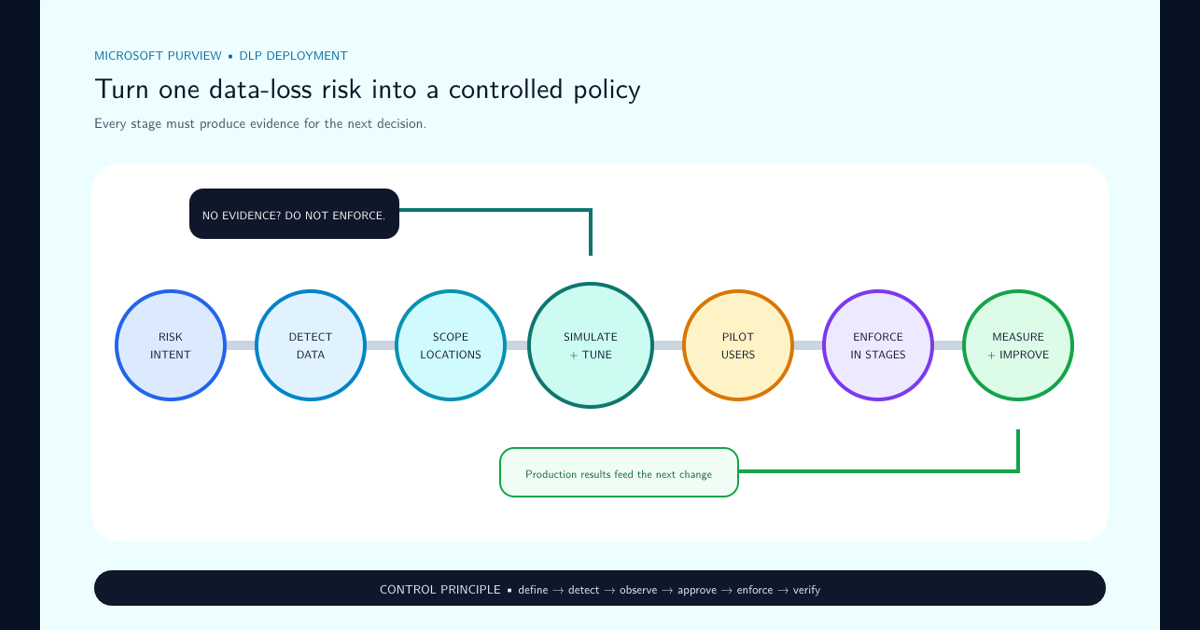
Treat DLP as an adaptive control system:
- Define the data-loss scenario.
- Detect the relevant information.
- Evaluate the user, location, and activity.
- Apply a proportional response.
- Observe the resulting events and user behavior.
- Tune the policy before increasing enforcement.
The objective is not zero data movement. Organizations require data to move in order to operate. The objective is to make legitimate movement safe while identifying and controlling movement that violates the organization’’s handling requirements.
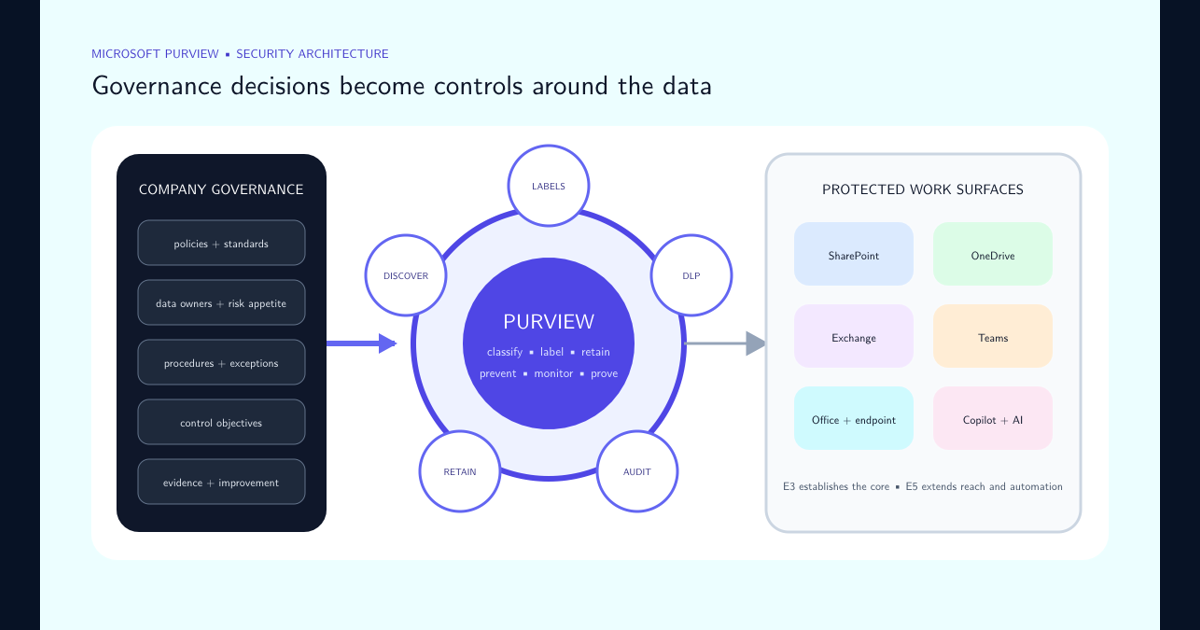
Read the Purview E3 and E5 security-layer guide when the design must connect DLP with sensitivity labels, retention, SharePoint permissions, Microsoft 365 workloads, Copilot, licensing, and company governance.
Start With a Policy Intent Statement
Before opening the DLP policy wizard, write down what the policy is supposed to achieve.
A useful policy intent statement identifies:
- The sensitive information being protected.
- The users or business functions involved.
- The locations where the control applies.
- The activity that creates risk.
- The response the organization expects.
- Any legitimate exceptions.
- The owner responsible for approving and reviewing the policy.
For example:
Prevent employees from transferring highly sensitive customer records to unmanaged destinations while allowing approved business workflows and recording justified exceptions.
That statement is significantly more useful than a requirement such as “block PII.”
Broad technical requirements often produce noisy rules because personally identifiable information can exist in legitimate business processes everywhere. A useful DLP design combines the sensitivity of the data with the context in which the activity occurs.
| Design question | Example |
|---|---|
| What information matters? | Customer financial records |
| Who handles it? | Finance and customer operations |
| Where should it exist? | Microsoft 365 and approved managed devices |
| What activity creates risk? | Upload to an unapproved cloud service |
| What should happen? | Block and notify the user |
| Are exceptions allowed? | Only for an approved workflow |
| Who owns the decision? | Data owner and security governance |
This policy-intent approach also makes future reviews easier. Administrators can evaluate whether a complicated technical rule still supports the original business requirement instead of preserving configuration simply because it already exists.
Use the Strongest Available Signal for Detection
DLP policy quality depends heavily on detection quality. If a rule cannot reliably distinguish sensitive business information from ordinary content, enforcement becomes noisy and users learn to distrust it.
Microsoft Purview provides multiple information signals that can participate in DLP policy design. The appropriate signal depends on what the organization is trying to recognize.
| Detection signal | Best suited for |
|---|---|
| Sensitive information types | Structured information such as identifiers, account numbers, government IDs, and other recognizable data patterns |
| Sensitivity labels | Content that has already received a business classification |
| Trainable classifiers | Categories defined more by meaning and context than by a fixed data pattern |
| Keywords or dictionaries | Narrow terminology where the vocabulary itself is meaningful |
| Context and activity conditions | Restricting rules to relevant users, locations, destinations, or actions |
Avoid assuming that a single sensitive information type is sufficient evidence for every blocking decision. A number resembling a credit-card number or personal identifier can appear in test data, documentation, logs, templates, or other legitimate content.
Confidence improves when several pieces of evidence support the same conclusion. Useful combinations can include:
- Sensitive information type plus minimum occurrence count.
- Sensitive information type plus a sensitivity label.
- Sensitive information type plus specific user population.
- Sensitive content plus an external destination.
- Sensitive content plus a risky endpoint activity.
- Sensitive content plus an unapproved browser or cloud destination.
The strongest DLP programs minimize reliance on generic keywords when better classification signals exist.
Where the organization already has a mature sensitivity-label taxonomy, labels can provide an especially valuable signal because they express the organization’’s own classification decision. DLP can then focus on whether the activity is permitted for information carrying that classification.
Design Policies Around Data Locations and User Journeys
Sensitive information rarely remains in one service. A document can begin in SharePoint, synchronize through OneDrive, open on a managed endpoint, be copied into an email, printed, uploaded through a browser, or shared through a collaboration application.
DLP architecture should therefore follow the data journey rather than treating each workload as an isolated security product.
Depending on licensing, configuration, workload support, and the policy scenario, Microsoft Purview DLP can protect information across multiple locations and interaction points, including Microsoft 365 services and managed endpoint devices.
A useful design exercise is to map the expected lifecycle of important data:
| Stage | Example DLP question |
|---|---|
| Creation | Is the information identifiable or labeled when it is created? |
| Storage | Where is the data permitted to reside? |
| Collaboration | Can it be shared externally or with guests? |
| Can the information be sent to external recipients? | |
| Endpoint use | Can it be printed, copied, or transferred to removable storage? |
| Browser transfer | Can it be uploaded to an unsanctioned cloud destination? |
| AI interaction | Is the content permitted in the relevant AI or Copilot interaction? |
| Exit or transfer | What happens when the user attempts to move the information outside approved controls? |
Do not automatically create one enormous DLP policy covering every location and activity.
Large policies become difficult to test, troubleshoot, and assign to business owners. Separate policies by meaningful risk scenario when doing so makes ownership, investigation, or tuning clearer.
A financial-record exfiltration policy, for example, can be easier to operate when its intent and evidence are distinct from a policy designed to prevent source-code uploads or accidental sharing of employee records.
Use a Graduated Enforcement Model
Blocking is only one possible DLP response.
An organization that starts by blocking every detected event will usually generate unnecessary operational friction and encourage users to route around the control. A mature program uses progressively stronger responses according to the confidence and impact of the scenario.
| Response | Appropriate use |
|---|---|
| Audit | Discovery, baselining, low-confidence detections, and investigation |
| User notification | Educating users about expected handling |
| Policy tip | Providing contextual guidance while the user is performing the activity |
| Override with justification | Allowing legitimate exceptions while retaining accountability |
| Restrict | Preventing only the risky portion of an otherwise legitimate workflow |
| Block | Stopping a high-confidence activity with unacceptable risk |
A practical maturity progression is:
- Observe. Understand how often the scenario occurs.
- Educate. Tell users why the activity creates risk.
- Require intent. Allow an override but require justification.
- Restrict. Block the risky action while preserving legitimate alternatives.
- Enforce. Hard-block activities where the evidence and business requirement are sufficiently strong.
This progression is not mandatory for every policy. A clearly prohibited transfer of extremely sensitive information might justify immediate enforcement after suitable testing.
The important principle is proportionality.
A policy protecting highly confidential merger documents from upload to an unsanctioned public service can justify a different response from a policy detecting a small quantity of personal information in an ordinary business email.
Use Simulation Mode Before Enforcement
Simulation mode is one of the most important safeguards in a Purview DLP deployment.
Microsoft recommends evaluating new policies and significant policy changes before enforcement. Simulation allows administrators to see which items and activities would match the policy without actually applying the configured enforcement actions.
Use simulation to answer practical questions:
- How many events does the policy match?
- Which users and departments generate the most events?
- Are expected sensitive items being detected?
- Are ordinary business files matching unexpectedly?
- Is one condition responsible for most false positives?
- Would a block affect a critical application or workflow?
- Are existing exceptions sufficient?
- Does another DLP rule already address the same event?
- Are policy tips understandable to the intended users?
Do not evaluate a simulation only by the total number of matches.
Review representative events manually and classify the results.
| Classification | Meaning |
|---|---|
| True positive | The policy correctly detected the intended risky activity |
| False positive | The activity matched technically but does not represent the intended risk |
| Expected exception | The match is valid but the business intentionally permits the workflow |
| Missed scenario | Known risky activity was not detected |
| Duplicate control | Another policy already provides an equivalent response |
The objective is not necessarily to reduce the match count. A policy with many true positives can be working correctly. The objective is to understand what the matches mean before those matches begin affecting users.
Extend Protection to Endpoint Activity
Cloud controls alone cannot fully address data loss because users eventually interact with information on devices.
Microsoft Purview Endpoint DLP extends DLP visibility and enforcement to supported onboarded Windows and macOS devices. Once devices are onboarded and configured, policies can evaluate sensitive content when users perform supported activities on those endpoints.
Depending on platform, configuration, policy conditions, and supported functionality, Endpoint DLP can help monitor or control activities such as:
- Copying sensitive data to removable storage.
- Printing sensitive files.
- Copying content to the clipboard.
- Transferring data to network shares.
- Accessing or transferring files through restricted applications.
- Uploading sensitive content through supported browsers.
- Moving information to restricted or unapproved destinations.
- Performing other supported exfiltration activities on managed devices.
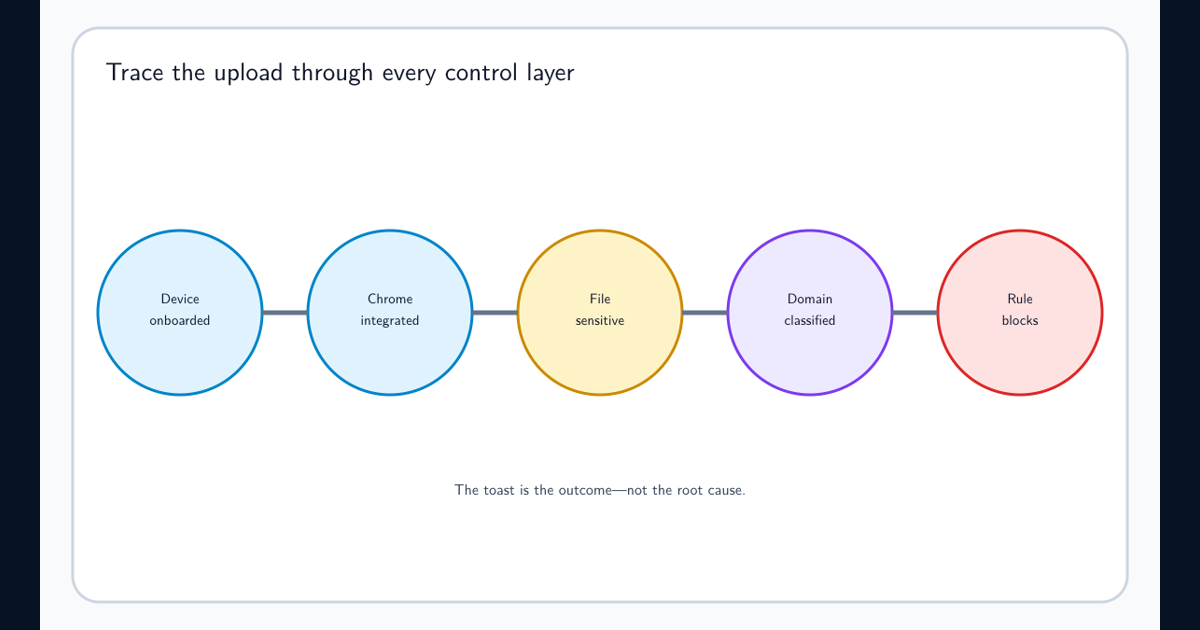
Browser enforcement adds its own dependencies. Use the Chrome upload troubleshooting guide to isolate device onboarding, extension behavior, destination mapping, cached decisions, and effective rules. For classifiers that need co-occurring terms, the custom SIT AND logic guide explains how primary and supporting elements replace Boolean expressions inside a keyword dictionary.
Endpoint policy design requires additional context because a device activity can be legitimate in one workflow and unacceptable in another.
Consider:
| Context | Why it matters |
|---|---|
| User or user group | Some business functions legitimately handle more sensitive information |
| Device group | Different device populations can require different enforcement |
| File classification | Higher classifications can justify stronger restrictions |
| Application | Approved business software can differ from unsanctioned applications |
| Destination | Corporate, partner, personal, and unknown destinations represent different risk |
| Activity | Printing, copying, uploading, and removable-media transfer have different business implications |
Scope early endpoint policies narrowly.
A focused policy protecting one known high-value dataset or one high-risk transfer path is easier to validate than a tenant-wide policy that immediately blocks many endpoint actions across every department.
Treat the User Experience as Part of the Security Control
A DLP notification should tell the user what happened, why it matters, and what they should do next.
Generic messages such as “Your organization does not allow this action” often create support tickets without teaching safer behavior.
Better policy tips answer three questions:
-
What was detected? Explain the relevant classification or data-handling rule without exposing unnecessary security logic.
-
Why is the action restricted? Connect the control to the business requirement.
-
What is the safe alternative? Tell the user how to complete the legitimate task through an approved workflow.
Example:
This file is classified Highly Confidential and cannot be uploaded to an unapproved cloud service. Use the approved SharePoint workspace for external collaboration or contact the data owner if an exception is required.
User overrides should also be designed intentionally.
If an override is appropriate, require a meaningful reason rather than allowing users to dismiss the warning without thought. The resulting justification becomes valuable operational data.
Repeated overrides can indicate:
- A legitimate business process missing from the policy design.
- An overly restrictive rule.
- Poor user understanding.
- A risky behavior pattern.
- An application or destination that should be formally assessed.
- A user population that requires additional guidance.
DLP therefore has both preventative and educational value. A policy tip delivered at the moment of risky activity can change behavior before an incident occurs.
Connect Sensitivity Labels and DLP
Sensitivity labels and DLP solve different parts of the information-protection problem.
Sensitivity labels answer:
What is this information, and how should it normally be handled?
DLP answers:
Is this particular activity appropriate for information of this sensitivity in this context?
Using the two together can produce policies that are easier to understand than rules based only on raw content detection.
| Classification | Example DLP treatment |
|---|---|
| Public | Minimal DLP restrictions |
| General / Internal | Warn on unusual external sharing |
| Confidential | Restrict transfer to unapproved destinations |
| Highly Confidential | Strong controls for external sharing, device transfer, and unapproved applications |
This table is an architectural example rather than a universal policy. The correct controls depend on the organization’’s own classification definitions and business requirements.
Label-based conditions are particularly useful when:
- The classification already reflects business context that content inspection cannot infer.
- Different kinds of sensitive data require the same handling policy.
- The organization wants DLP enforcement to follow the classification taxonomy.
- Encrypted or otherwise protected information can still be evaluated through supported metadata-based conditions in scenarios where content inspection is unavailable.
Do not assume that every label automatically requires a DLP rule. Only create enforcement where the label implies a meaningful handling restriction.
Monitor Outcomes, Not Just Rule Matches
DLP administration does not end when a policy is turned on.
Microsoft Purview provides monitoring, alerting, activity investigation, simulation results, and analytics capabilities that can help administrators understand how policies behave and where data-protection risk exists.
Operational reviews should examine both technical accuracy and user behavior.
Track metrics such as:
- DLP matches by policy and rule.
- Events by user, department, device, and location.
- Blocks versus warnings.
- User overrides and override justifications.
- False-positive reports.
- Repeat offenders or repeat risky workflows.
- Sensitive information types generating excessive noise.
- High-risk destinations.
- Policies that rarely or never match.
- Policies with unexpectedly high match volumes.
- Endpoint activities involving removable media, printing, browsers, or applications.
- Time required to investigate important DLP alerts.
Do not assume a high match count means a policy is effective.
A useful policy changes risk.
For example, if users initially attempt to upload confidential files to unapproved services but those attempts decline after policy tips are introduced, that behavior change can represent a valuable security outcome even when hard blocks remain rare.
Conversely, a policy generating thousands of overrides every week may be technically active but operationally weak.
Review DLP analytics and event patterns for blind spots as well as excessive enforcement. Data-loss risk can exist where no policy currently matches because the organization has not yet modeled that scenario.
Govern DLP Policies as Production Security Controls
DLP policies can affect email delivery, collaboration, endpoint workflows, printing, browser uploads, external sharing, and other everyday business activity. They should therefore be governed like other production security controls.
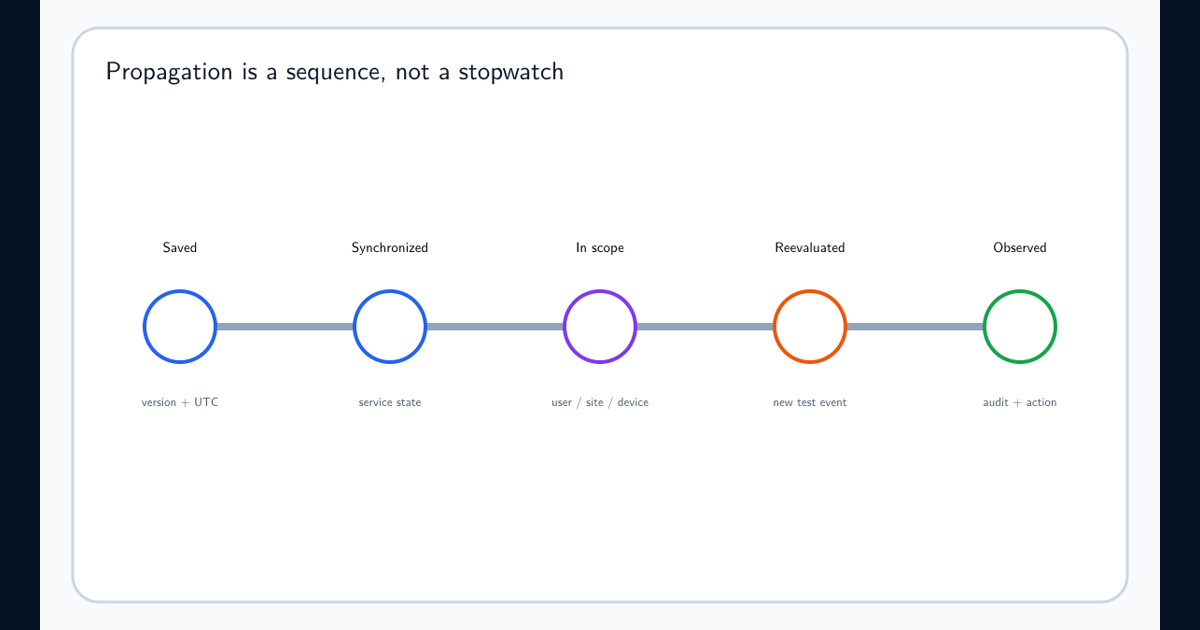
When a controlled change is not visible, diagnose the DLP propagation delay by workload and evidence stage rather than applying a universal waiting period.
Every important DLP policy should have documented ownership.
A practical policy register can include:
| Field | Purpose |
|---|---|
| Policy name | Stable administrative identifier |
| Business intent | Why the policy exists |
| Data owner | Business owner for the protected information |
| Technical owner | Team responsible for configuration |
| Scope | Users, groups, devices, and locations |
| Detection logic | Labels, sensitive information types, classifiers, or conditions |
| Enforcement | Audit, notify, override, restrict, or block |
| Exceptions | Approved exclusions or workflows |
| Dependencies | Labels, device onboarding, applications, browser controls, or other services |
| Review date | Next scheduled policy review |
| Success criteria | How effectiveness is measured |
Apply change management when modifying production policies.
A seemingly small change to an occurrence threshold, destination restriction, sensitive information type, exception, or user scope can substantially alter the number of users affected.
Material changes should normally return to simulation or another controlled validation process before broad enforcement.
Avoid creating policies with no owner and no retirement criteria. Security teams frequently accumulate old DLP rules whose original business requirement no longer exists, making troubleshooting and policy interaction increasingly difficult.
A Practical DLP Best-Practice Baseline
A defensible Microsoft Purview DLP program can be summarized as a set of operating rules.
Design from business risk. Write a policy intent statement before configuring conditions and actions.
When that intent is approved and you are ready to implement it, follow the step-by-step DLP policy creation guide from prerequisite checks through simulation, pilot enforcement, and production verification.
Use strong detection signals. Prefer sensitivity labels, sensitive information types, classifiers, and meaningful context over broad keyword matching whenever stronger evidence exists.
Scope narrowly before scaling. Begin with specific users, data, destinations, devices, or activities and expand only after the policy is understood.
Simulate first. Run new or significantly changed policies without enforcement and review representative matches before affecting production workflows.
Use proportional enforcement. Audit low-confidence activity, educate users where behavior can be corrected, allow controlled overrides where legitimate exceptions exist, and hard-block scenarios where the risk justifies it.
Protect the complete data journey. Consider Microsoft 365 locations, endpoints, browsers, external destinations, and collaboration workflows rather than assuming repository controls alone prevent data loss.
Integrate with sensitivity labels. Reuse classification as policy context where it simplifies enforcement and aligns DLP with the organization’’s information-handling model.
Make policy tips useful. Explain the reason for the control and give the user a safe alternative instead of presenting a generic denial.
Measure behavior. Review matches, overrides, false positives, recurring destinations, endpoint activities, and changing user behavior.
Govern policy changes. Assign owners, maintain documentation, test material modifications, and retire rules that no longer support a real business requirement.
The target state is not a tenant where every possible transfer is blocked.
The target state is an environment where sensitive information can move through approved business workflows while risky movement is consistently identified, understood, and controlled.
Frequently asked questions
Where should an organization start with Microsoft Purview DLP?
Start with a clearly defined business risk rather than creating broad blocking rules immediately. Identify the information to protect, the users and locations involved, the risky activities that matter, and the desired response. Build the policy from that intent and validate it in simulation mode before enforcement.
Should new DLP policies be deployed directly in blocking mode?
Usually no. New and materially changed DLP policies should first be evaluated in simulation mode so administrators can understand matches, false positives, user impact, and policy interactions before enforcement is introduced.
Should every DLP match block the user?
No. The appropriate response depends on the risk. Some events only require auditing, others should educate the user with a policy tip, some may permit a documented business override, and high-risk scenarios may justify blocking. Enforcement should be proportional to the sensitivity of the information and the risk of the activity.
Can sensitivity labels be used inside DLP policies?
Yes. Sensitivity labels can be used as policy conditions in supported DLP scenarios, allowing the organization to apply different controls according to an existing classification decision instead of relying only on content inspection.
What does Endpoint DLP add to Microsoft Purview?
Endpoint DLP extends protection to supported managed devices and can monitor or restrict activities involving sensitive files, such as copying data to removable media, printing, copying to clipboard, accessing certain applications, or transferring information through supported network and browser scenarios.
Are user overrides a security weakness?
Not necessarily. A justified override can be useful when legitimate business exceptions exist. The important design decision is to allow overrides only where appropriate, capture the reason, audit the activity, and review repeated or unusual override patterns.
What is the purpose of a DLP policy tip?
A policy tip gives users contextual guidance when their action or content matches a DLP rule. Well-designed tips explain the risk and the expected handling behavior at the moment the user is making the decision, which can prevent accidental data loss without requiring an immediate hard block.