Microsoft Purview Data Lifecycle Management Guide
Use Microsoft Purview Data Lifecycle Management to design retention policies, labels, records, disposition reviews, and defensible deletion controls.
How Microsoft Purview Data Lifecycle Management Works
Keeping everything can feel safer than deciding what to delete. In practice, indefinite retention increases discovery volume, privacy exposure, breach consequence, storage pressure, and the chance that obsolete information will be mistaken for current truth. Deleting too early creates a different risk: the organization may lose evidence, records, contractual history, or information required by law.
Microsoft Purview Data Lifecycle Management is designed to retain content that must be kept and delete content that no longer has value. The Data Lifecycle Management documentation positions retention policies as the broad foundation across supported Microsoft 365 workloads. Records Management adds controls for high-value legal, regulatory, and business records.
Begin outside the portal. Build a retention schedule that identifies information classes, authoritative owners, legal or business purpose, triggering event, duration, disposition action, exceptions, and evidence required. Purview implements that schedule; it should not be expected to invent it.
Choose Container-Wide Policies or Item-Level Labels Deliberately
A retention policy applies broadly to locations such as Exchange mailboxes, SharePoint sites, OneDrive accounts, Microsoft 365 groups, Teams, and other supported services. It is useful when most content in that location follows the same rule and user action should not be required.
A retention label applies to an individual item such as a document or message. Labels support exceptions, more specific start conditions, automatic application, record declaration, disposition review, and other item-level behavior. Microsoft explicitly recommends using Records Management rather than ordinary lifecycle labels when managing high-value records.
Do not confuse retention labels with sensitivity labels. Sensitivity describes handling and protection. Retention describes how long an item must remain and what happens afterward. The two can reinforce each other, but one does not automatically determine the other.
Define When the Retention Clock Actually Starts
A seven-year requirement is incomplete until you know seven years from what. Purview can calculate retention from conditions such as creation, last modification, label application, or a specified event, depending on the policy or label and workload.
Event-based retention is useful when the business event occurs after the content was created. Employee records might be retained from departure; contract records from expiration; product records from the last manufacturing date. Microsoft explains that content associated with an event-based label can remain retained indefinitely until the relevant event occurs and starts the period.
The relationship among event type, event, asset identifier, and labeled content must be dependable. A missing or incorrect asset identifier can leave a record waiting forever or associate it with the wrong event. Reconcile event sources, validate affected items, and preserve the event record that explains why the clock began.
Understand the Result When Policies, Labels, and Holds Overlap
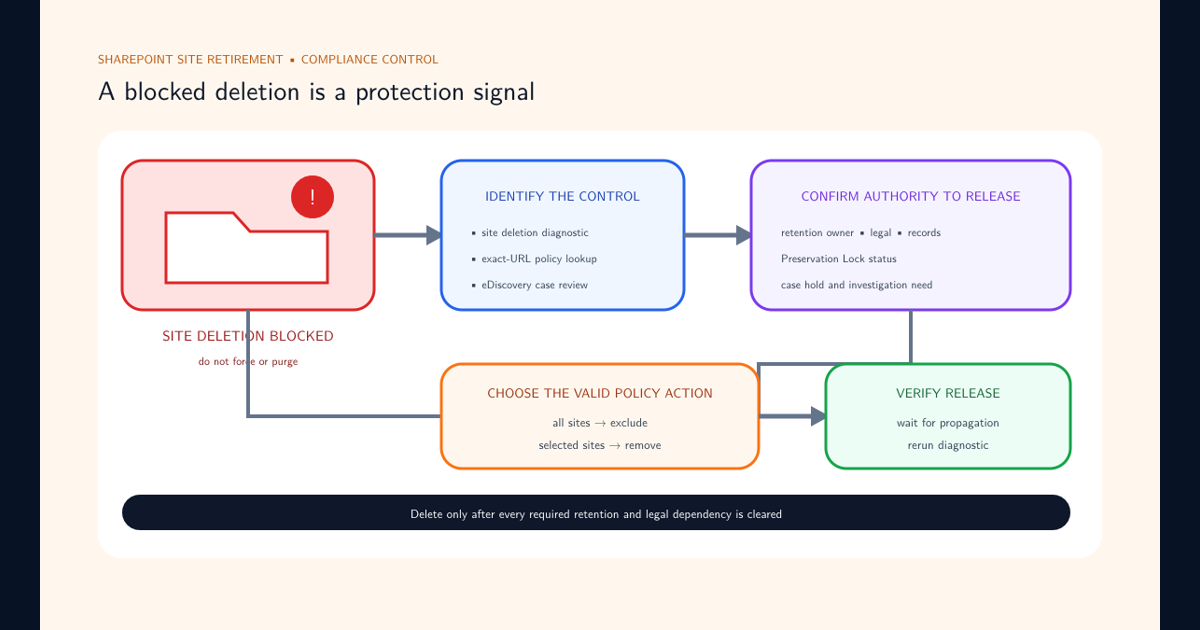
Content can be subject to more than one retention policy, an item-level label, record restrictions, and an eDiscovery hold. The effective outcome is determined by Microsoft’s retention principles rather than simple policy order. When those controls prevent a site from being retired, follow the SharePoint site deletion blocked by retention guide to identify every dependency and choose exclusion or removal without bypassing preservation.
The Microsoft retention principles explain how retaining content generally takes precedence over permanent deletion, how the longest retention period can prevail among retention settings, and how explicit item-level retention can take priority over broader implicit policy. Exact behavior depends on the combination and workload.
Do not teach administrators a slogan and expect them to predict every case. Use policy lookup for the specific user, site, or group where supported, inspect the item’s label, identify holds, and document the effective outcome. Changes should be tested against representative content before production rollout.
Declare Records Only When Their Additional Governance Is Needed
The Records Management documentation describes record declaration through retention labels. A record can receive restrictions on permitted actions, additional audit events, and proof of disposition when deleted at the end of its period. Regulatory records can impose stronger restrictions.
Those controls are valuable for contracts, formal decisions, regulated communications, and other high-value evidence. They also change user and application behavior. Record properties, unlocking behavior, versioning, movement, and deletion need testing with the workloads and processes that will handle the item.
Use a file plan to connect labels with the organization’s retention schedule and business classification. Define who can create, publish, apply, change, unlock, review, and dispose of records. Record status should express a governed decision about the item, not become a blanket label for anything the organization is afraid to delete.
Disposition Is an Accountable Decision, Not the Absence of Retention
At the end of a retention period, a label can delete content automatically, trigger disposition review, apply another label, or support another configured action. Disposition review is appropriate when a records manager must confirm that the item is no longer subject to a business, legal, or regulatory reason to retain it.
Reviewers need enough context to decide. The file plan classification, owner, event, retention history, record status, related matter, and any active hold should be understandable. Multi-stage review can separate business confirmation from records or legal approval, but too many stages can create an unmanageable queue.
Microsoft documents proof of disposition for supported record and review scenarios. Preserve that evidence according to the organization’s requirements. A defensible deletion program can explain what was deleted, under which authority, after which review, and with which exceptions—not merely that storage usage declined.
Deploy Lifecycle Controls as a Migration of Business Rules
Retention changes affect existing content, future content, user expectations, legal obligations, and downstream applications. Inventory current Exchange MRM rules, legacy archives, labels, policies, holds, connectors, and manual records processes before adding a new model. Microsoft generally recommends modern Microsoft 365 retention capabilities over older Exchange-only features unless a specific requirement remains.
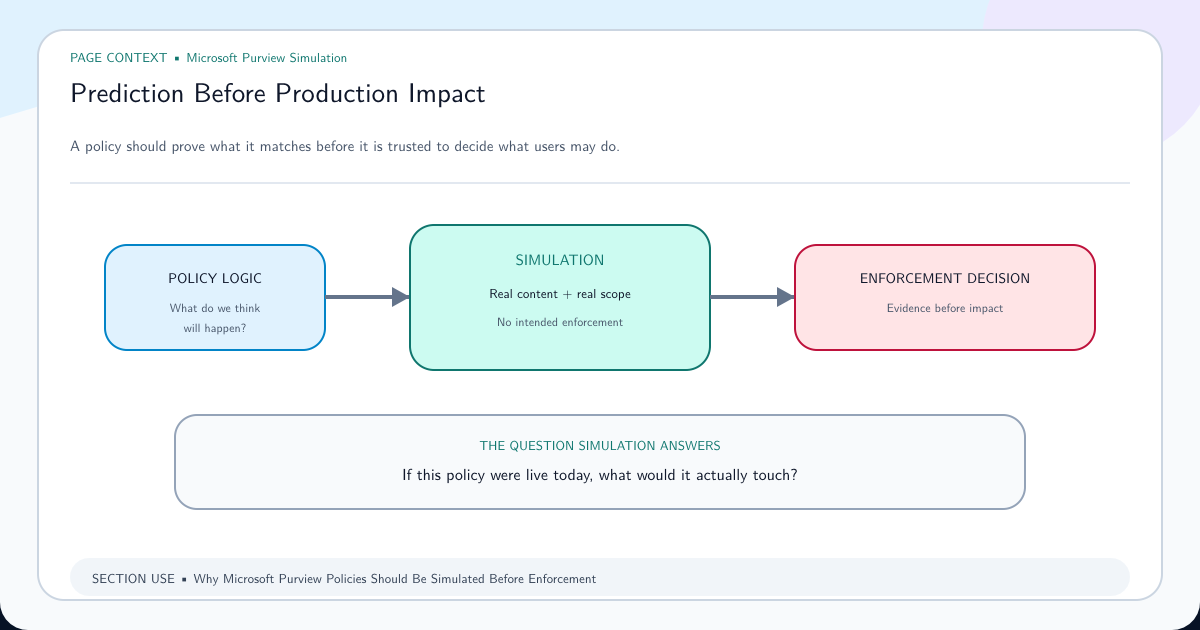
Use a simulation-first approach even where the product does not provide a single simulation button. Model selection, pilot scope, inspect labeled content, test event matching, verify preservation after user deletion, examine policy lookup, and rehearse disposition with nonproduction records.
Measure coverage, unlabeled exceptions, policy errors, events without matching assets, pending disposition volume, reviewer aging, failed deletion, inactive mailbox behavior, and hold conflicts. The desired outcome is not maximum retention. It is reliable, explainable control over when information enters, remains in, and leaves the organization’s managed estate.
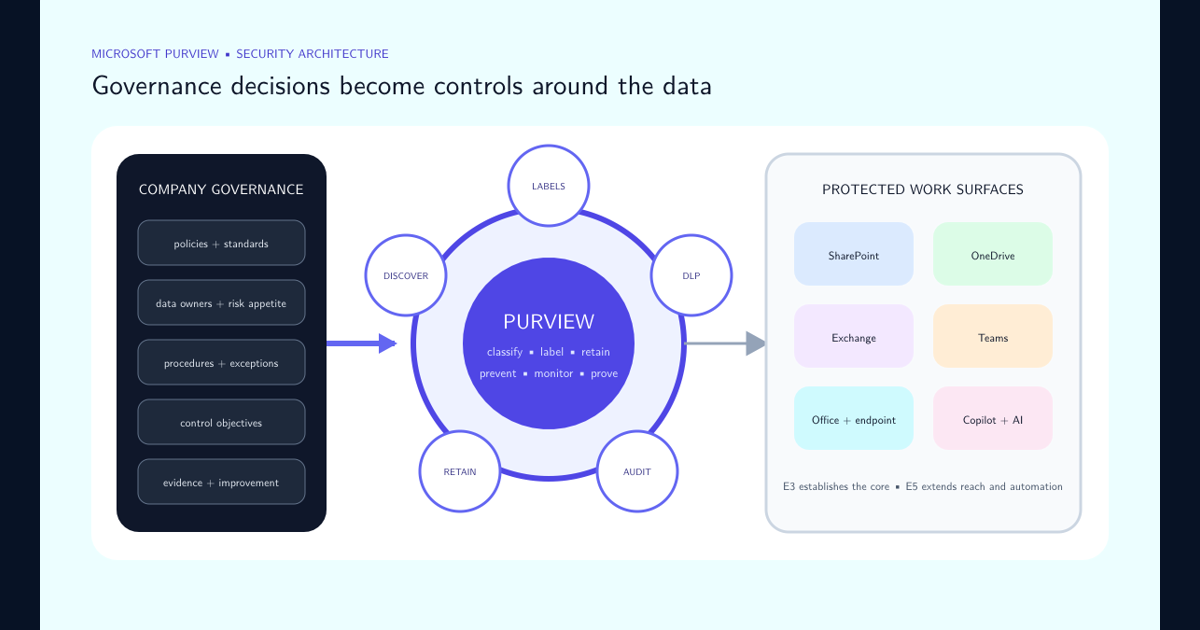
Use the Purview E3 versus E5 protection model to place lifecycle controls alongside sensitivity, DLP, SharePoint, Microsoft 365, Copilot, and the company governance artifacts that authorize every rule.
Frequently asked questions
What is the difference between a retention policy and a retention label?
A retention policy generally applies at a container or location level, such as mailboxes or SharePoint sites. A retention label applies to individual items and supports capabilities such as item-level exceptions, event-based retention, record declaration, disposition review, and proof of disposition.
Does a delete action always immediately remove content permanently?
No. Retention, workload behavior, holds, preservation locations, recycle stages, and the retention processing lifecycle can affect when content becomes permanently unavailable. Design and verify the actual outcome for every supported workload.
Is an eDiscovery hold the same as a retention policy?
No. A hold preserves potentially relevant content for a specific legal or investigative matter. Retention policies and labels govern content according to ongoing lifecycle requirements. They can overlap, and preservation may prevent permanent deletion until the hold is released.
Should every retained item be declared a record?
No. Record declaration adds restrictions, audit behavior, and proof-of-disposition capabilities intended for high-value items. Broad lifecycle retention can often be handled with policies without declaring every item a record.