Microsoft Purview Simulation First: Why Testing Policies Before Enforcement Matters
Simulation mode is one of the most important safety mechanisms in Microsoft Purview. Learn what it can reveal, what it cannot prove, the advantages and limitations, and how to turn simulation results into an evidence-based enforcement decision.
At 16:45 on a Friday, a new Microsoft Purview policy can look perfectly reasonable.
The condition is correct. The sensitive information type is selected. The label appears appropriate. The rule targets the right locations. The action is exactly what the security requirement requested.
Then enforcement begins.
Twenty minutes later, Finance cannot send a spreadsheet to its external auditor.
A project team discovers that documents it has collaborated on for months are receiving an encrypting sensitivity label.
An automated process starts producing files that downstream users cannot open.
The help desk sees an increase in policy-related tickets.
Security discovers that a detection condition intended to identify a narrow category of sensitive information also matches thousands of ordinary documents.
Nothing in the policy editor necessarily looked wrong.
The mistake was assuming that correct configuration meant correct production behavior.
Microsoft Purview simulation capabilities exist to close that gap.
Simulation lets an organization move from:
“We believe this policy is correct.”
to:
“We have evidence showing what this policy will match in our environment.”
That difference matters whenever a Purview policy can change what happens to production information.
DLP can restrict user activity.
Auto-labeling can change classifications.
Sensitivity labels can introduce encryption.
Retention auto-labeling can change information lifecycle behavior.
Other Purview analytics and evaluation capabilities can expose policy effects and risk patterns before an organization commits to more disruptive controls.
Simulation is therefore not a delay before deployment.
Simulation is part of deployment.
A Policy Editor Cannot Show You Your Data Estate
Purview administrators configure policies using abstractions.
They select:
- Users.
- Groups.
- Locations.
- Sensitive information types.
- Sensitivity labels.
- Trainable classifiers.
- Activities.
- Thresholds.
- Exceptions.
- Actions.
But the real environment contains millions of objects and thousands of behaviors that cannot be represented in a configuration screen.
A seemingly precise condition might encounter:
- Test data.
- Templates.
- Historical files.
- Scanned documents.
- System-generated reports.
- Shared mailboxes.
- Service accounts.
- Old SharePoint sites.
- Development environments.
- Legitimate partner transfers.
- Automated exports.
- Business processes the security team did not know existed.
This creates a fundamental gap:
| Policy design sees | Production contains |
|---|---|
| A sensitive information type | Millions of real content variations |
| A user group | Employees performing different business roles |
| An external destination | Auditors, customers, partners, personal services, suppliers |
| A classifier | True positives, false positives, and edge cases |
| A label | Files, email, permissions, collaboration, and automation |
| A block action | A person trying to complete actual work |
Simulation brings production evidence into the design process without immediately turning every match into enforcement.
Think of Simulation as a Wind Tunnel
Aircraft engineers do not prove an aircraft design by looking at its blueprint.
They expose it to conditions.
Microsoft Purview policy design should be approached similarly.
If your immediate task is DLP configuration, use the practical guide to create a Microsoft Purview DLP policy step by step, then return here to judge whether its simulation evidence is strong enough for enforcement.
The policy editor is the blueprint.
Simulation is the wind tunnel.
Enforcement is the flight.
The purpose of simulation is not to prove that the syntax of the policy is valid. Purview already understands whether the policy can be saved.
The purpose is to discover how the logic behaves when it meets the organization’s actual data and activity.
A useful mental model is:
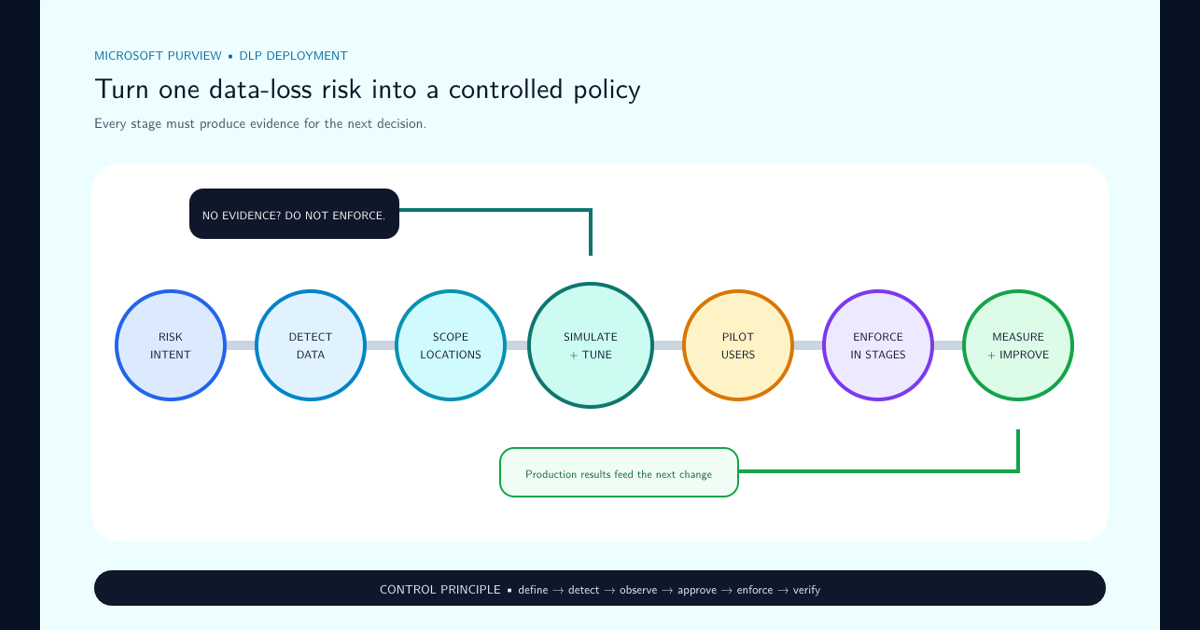
Intent → Configuration → Simulation → Evidence → Decision → Enforcement
Skipping simulation changes that sequence into:
Intent → Configuration → Enforcement → Incident → Tuning
Both approaches eventually produce information about how the policy behaves.
Only one learns before users experience the consequences.
Simulation Is Not One Single Purview Feature
The word simulation appears across different Purview scenarios, but the exact capability differs by solution.
That distinction matters.
Data Loss Prevention
DLP simulation evaluates a policy as though it were enforced but without applying the configured enforcement actions.
Administrators can investigate policy matches and alerts to understand impact before production enforcement.
Sensitivity auto-labeling
Auto-labeling policies can be simulated so administrators can preview which supported Microsoft 365 items would receive a sensitivity label.
This is especially important when the target label includes:
- Encryption.
- Restrictive permissions.
- Visible markings.
- Other consequential protection settings.
Retention auto-labeling
Supported retention-label auto-application scenarios also provide simulation capabilities for evaluating matching items before labels are broadly applied.
Retention simulation deserves the same seriousness as security-policy simulation because incorrect lifecycle actions can retain information too long or eventually contribute to deletion at the wrong time.
Insider Risk Management
Insider Risk Management provides analytics that can help organizations evaluate potential risk activity without first deploying a full insider-risk policy.
This is conceptually similar to simulation-first thinking: understand the signal landscape before creating aggressive policy responses.
The broader lesson
Purview contains multiple mechanisms for observing before enforcing.
They do not all behave identically and should not be documented as though they are one common engine.
The common operating principle is what matters:
Use available evidence-gathering modes before enabling consequential automation.
The Pros and Cons of Simulation
Simulation is valuable, but it is not free.
It introduces additional time, review effort, and operational discipline into policy deployment.
That tradeoff should be explicit.
| Advantages | Limitations |
|---|---|
| Shows production matches before enforcement | Extends deployment time |
| Reveals unexpected scope | Requires somebody to review results |
| Identifies false positives | Cannot prove that every false negative has been found |
| Shows which users and locations are affected | Does not reproduce every client-side user experience |
| Helps estimate support impact | Results depend on representative activity occurring during the evaluation |
| Allows thresholds to be tuned | Quiet periods can create false confidence |
| Provides evidence for business-owner approval | Large result sets can be difficult to review manually |
| Reduces disruptive policy changes | Simulation itself does not resolve bad policy design |
| Supports safer automation | Does not eliminate the need for pilot deployment |
| Makes policy discussions evidence-based | Data changes after simulation completes |
The disadvantages are primarily costs of discipline.
The alternative costs can be much higher.
A week spent validating an encryption auto-labeling policy can appear slow.
Recovering thousands of incorrectly encrypted documents can make that week look very inexpensive.
The Biggest Benefit Is Not False-Positive Detection
False-positive detection is one of the obvious reasons to simulate.
It is not the only reason.
Simulation reveals scale.
Imagine a DLP rule intended to detect a particular form of financial information.
Security tests ten documents manually.
Eight behave exactly as expected.
Two do not match.
The condition is adjusted and the ten tests now look perfect.
That sounds encouraging.
Then simulation runs against the production scope and reveals:
- 63,000 matches.
- 21,000 matches in a single automated reporting workflow.
- 9,000 matches generated by test files.
- Hundreds of external transfers to an approved auditor.
- A small set of very high-risk uploads to personal storage.
The original ten-document test answered:
Does the detection work?
Simulation answered:
What does this detection mean in our organization?
The second question is much more important before enforcement.
Small Error Rates Become Large Operational Events
Purview policies operate at enterprise scale.
That changes how classification accuracy should be interpreted.
Consider an auto-labeling policy evaluating 2,000,000 files.
Suppose the detection logic produces a 1% false-positive rate.
2,000,000 files
× 1% false-positive rate
= 20,000 incorrect matches
If the label is classification-only, the organization has 20,000 classification-quality issues.
If the label applies a watermark, 20,000 files may carry an incorrect marking.
If the label applies encryption, the same 20,000 mistakes can become access-control events.
The percentage has not changed.
The consequence has.
| Automated outcome | Impact of 20,000 false positives |
|---|---|
| Classification metadata | Incorrect governance metadata |
| Recommendation | Users receive unnecessary prompts |
| Visual marking | Incorrect markings appear |
| Retention label | Lifecycle behavior may be incorrect |
| DLP blocking rule | Legitimate activities may be prevented |
| Encryption | Legitimate access may be disrupted |
The higher the impact of the automated action, the stronger the evidence threshold should be before enforcement.
DLP Simulation: Ask What Would Have Happened to the User
DLP simulation should not be reviewed as a list of technical matches.
Every simulated match represents a future user experience.
Suppose a simulated event shows:
User: Finance employee
Content: Confidential spreadsheet
Destination: External recipient
Rule action: Block
Do not stop at:
The rule matched correctly.
Ask:
- Who is the external recipient?
- Is this transfer expected?
- Is the recipient a customer, supplier, regulator, auditor, or personal account?
- Is the spreadsheet already protected?
- Is there an approved alternative workflow?
- Would the block prevent a legitimate deadline?
- Should the user receive a warning instead?
- Should justification be allowed?
- Does this scenario require a narrow exception?
- Is the exception based on user, domain, label, destination, or another condition?
The simulation dashboard becomes much more valuable when matches are interpreted as business scenarios rather than security events alone.
Review DLP results in three buckets
Expected and unwanted
The policy correctly identified risky activity.
These matches support enforcement.
Expected but legitimate
The detection is technically correct, but the workflow is permitted.
These matches identify potential exceptions or policy redesign.
Unexpected
The condition is matching something the policy was not intended to control.
These matches require tuning before enforcement.
This three-bucket review is often more useful than simply calling every result true or false.
Auto-Labeling Simulation Has a Higher Bar When Protection Follows
Sensitivity auto-labeling introduces a special form of risk.
The system is no longer only observing information.
It is deciding what the information is.
If the resulting label is classification-only, an incorrect match primarily creates metadata-quality problems.
If that label applies protection, the classification decision can trigger additional consequences.
Consider this progression:
Classifier match
    ↓
Auto-labeling policy
    ↓
Sensitivity label
    ↓
Encryption
    ↓
Access changes
Each step increases the importance of the decision before it.
Simulation results for an encrypting label should therefore be reviewed with the business owner, not only by the Purview administrator.
Ask business owners to examine representative matches and answer:
If this document had been encrypted automatically yesterday, would that have been the correct outcome?
If the answer is uncertain, enforcement is premature.
Extra checks for auto-labeling that results in encryption
- Representative matched files manually reviewed.
- False positives quantified.
- High-volume repositories inspected.
- Trainable classifier accuracy reviewed where applicable.
- Sensitive information type thresholds validated.
- Existing higher labels understood.
- Intended users retain access.
- External collaboration tested.
- Coauthoring tested.
- SharePoint and OneDrive behavior tested.
- Recovery procedure tested.
- Application dependencies tested.
- Rollback procedure documented.
Simulation is not merely a classification-quality check when encryption follows.
It becomes part of access-control change management.
Retention Simulation Protects Against a Different Kind of Mistake
DLP mistakes are often visible quickly.
A user tries to perform an action and receives a warning or block.
Retention mistakes can be quieter.
An incorrect retention-label decision can influence how information is retained or when it can eventually be deleted.
That makes simulation important for a different reason:
The impact might not be obvious at the moment the policy is deployed.
When evaluating an auto-apply retention-label policy, review representative matches with records, legal, compliance, and data owners where appropriate.
Ask:
- Is this actually the record category we intended?
- Are drafts matching?
- Are copies matching?
- Are templates matching?
- Are unrelated documents using similar language?
- Are old historical items unexpectedly included?
- Is the retention period appropriate for every matched category?
- What happens if the classifier is wrong?
- Does the policy overlap another lifecycle requirement?
Simulation gives the organization an opportunity to challenge the information-selection logic before lifecycle controls become widespread.
Trainable Classifiers Make Simulation More Important, Not Less
Machine learning can create a dangerous psychological shortcut:
The classifier is sophisticated, therefore the result must be accurate.
Trainable classifiers can identify information based on patterns and meaning that are difficult to represent through simple regular expressions or keywords.
They can also produce false positives and false negatives.
Their results should therefore be evaluated exactly as other classification evidence is evaluated: against representative organizational content.
Simulation is particularly valuable when a trainable classifier drives:
- Sensitivity auto-labeling.
- Retention auto-labeling.
- Communication compliance or other supported classification scenarios.
- Policies whose downstream result is difficult to reverse.
Review not only whether matched documents look correct.
Review why similar documents did not match.
A useful validation set includes:
| Sample group | Purpose |
|---|---|
| Clear positives | Confirm obvious intended content matches |
| Clear negatives | Confirm unrelated content stays outside scope |
| Near positives | Test documents that resemble the target category |
| Templates | Determine whether layout or boilerplate causes overmatching |
| Historical documents | Test changes in language and document style |
| Multiple departments | Detect business-unit bias |
| Multiple authors | Avoid learning one person’s writing patterns |
| Edge cases | Understand decision boundaries |
If a trainable classifier will ultimately cause encryption or retention behavior, its simulation results deserve the same scrutiny as any other high-impact automation.
What Simulation Cannot Tell You
Simulation is evidence.
It is not certainty.
Understanding that limitation prevents a different failure mode: treating a clean simulation as permission to deploy globally without further thought.
Simulation might not fully prove:
User experience
A simulated match can show that an activity would be affected.
It does not always reproduce how every Office client, browser, mobile application, endpoint workflow, or third-party application will present that effect to a user.
Application compatibility
A sensitivity auto-labeling simulation can identify files that would receive a label.
It does not automatically prove that every downstream system can consume those files after encryption is enabled.
Future behavior
Simulation observes the environment during a period of time.
New applications, users, data, projects, file formats, destinations, and workflows appear later.
False negatives
Simulation shows what the policy matched.
Determining what it should have matched but did not often requires separate known-positive testing.
Rare workflows
Month-end processing, annual audits, acquisitions, regulatory submissions, board meetings, seasonal activity, and disaster-recovery exercises might not occur during a short simulation window.
Human reaction
Users change behavior when a policy begins warning or blocking them.
Some find safer workflows.
Others repeatedly override.
Some open support tickets.
Some attempt to work around the control.
Simulation cannot fully predict those responses.
This is why the safest sequence is:
Simulation → Pilot → Limited enforcement → Broader enforcement
Do Not Measure Simulation Quality by the Number of Days It Ran
A common question is:
How many days should we leave the policy in simulation?
Time alone is a weak measure.
Seven days can be enough for one policy and almost meaningless for another.
Instead ask whether the simulation observed the business conditions that matter.
Coverage questions
- Did a normal working week occur?
- Did remote and office workers participate?
- Did relevant departments generate activity?
- Did high-volume processes run?
- Did scheduled integrations run?
- Did external collaboration occur?
- Did important file repositories receive activity?
- Did enough policy matches occur to evaluate accuracy?
- Did any month-end or quarter-end workflow matter?
- Did the intended classifier see enough representative content?
A policy with three results after two weeks has technically run longer than a policy with 50,000 representative results after three days.
It might still provide less useful evidence.
Define exit criteria based on evidence rather than calendar duration.
Build a Simulation Scorecard
Avoid approving a policy based on screenshots and intuition.
Use a repeatable scorecard.
| Metric | Question |
|---|---|
| Total matches | How large is the enforcement population? |
| Unique users | How many people would be affected? |
| Locations | Which services or endpoints generate matches? |
| True-positive sample | Does the rule detect the intended scenario? |
| False-positive sample | How often does ordinary work match? |
| Known false negatives | Are known risky examples being missed? |
| Top matching condition | Which rule drives most results? |
| Top departments | Is one business function disproportionately affected? |
| High-volume workflow | Is automation generating repeated matches? |
| External destinations | Are approved partners mixed with risky destinations? |
| Exception count | How complicated will production policy become? |
| Existing policy overlap | Is another Purview policy already addressing this scenario? |
| Support impact | What would users experience if enforcement began? |
| Rollback readiness | Can the change be reversed safely? |
Add a simple disposition to reviewed events:
- Correct — enforce
- Correct — exception required
- Incorrect — tune
- Unclear — business review
- Duplicate — policy rationalization
The purpose is to turn a large set of matches into an enforcement decision that can be explained later.
Security Should Not Approve the Simulation Alone
Security teams understand Purview controls.
Business owners understand whether a workflow is legitimate.
Both perspectives are required.
Consider a DLP simulation showing repeated transfers of sensitive customer information to an external domain.
Security sees:
Sensitive data leaving the tenant.
Sales operations might see:
Our approved fulfillment partner receives this file every night.
Neither view is sufficient alone.
The correct question is:
Is this transfer authorized, appropriately protected, and implemented through the right control?
This is why simulation reviews should involve the people who own the data and the workflow.
Suggested responsibilities
| Role | Simulation responsibility |
|---|---|
| Purview administrator | Configure policy and provide technical results |
| Security | Assess risk and control strength |
| Data owner | Confirm sensitivity and expected handling |
| Business process owner | Validate legitimate workflows |
| Legal / Compliance | Review regulatory implications where applicable |
| Records team | Review lifecycle consequences for retention scenarios |
| Application owner | Validate technical dependencies |
| Help desk | Prepare support path |
| Change management | Coordinate user communication where needed |
Simulation turns policy deployment from a security configuration task into a business risk decision.
Red Flags That Mean You Should Not Enforce Yet
Some simulation findings should stop deployment immediately.
Stop if one business process creates most matches
This often means the policy is detecting a workflow rather than a risk.
Investigate the workflow before blocking it.
Stop if nobody can explain the high-volume matches
Unknown does not mean malicious.
Unknown means more investigation is needed.
Stop if false positives are concentrated in a common template
Fix the detection logic before enforcement.
Stop if the exception list is growing faster than the policy
The policy model might be wrong.
Do not solve poor detection by endlessly adding exclusions.
Stop if encryption is involved and recovery has not been tested
Access-control automation without tested recovery is an availability risk.
Stop if the business owner has not reviewed representative results
Technical correctness does not prove business correctness.
Stop if results are almost empty when high activity was expected
The policy might be scoped incorrectly or missing the intended signal.
A simulation with zero matches is not automatically a success.
It can also be evidence that the policy is not detecting anything.
Stop if a critical location was excluded accidentally
Fix the scope and rerun.
Stop if enforcement behavior has no rollback plan
A production policy needs a safe way back.
Zero Matches Can Be More Dangerous Than Thousands
Administrators naturally worry when simulation returns too many matches.
They should also worry when it returns none.
A zero-result simulation can mean:
- The risk does not currently exist.
- The content has not appeared during the simulation period.
- The wrong location was selected.
- The wrong users were scoped.
- The sensitive information type does not match the real format.
- The classifier is too narrow.
- The occurrence threshold is too high.
- An exception excludes everything.
- The target content is protected in a way the selected detection method cannot inspect.
- The policy is configured incorrectly.
Before approving a zero-match policy, create or identify a known-positive test case.
Ask:
We know this item should match. Does it?
If the answer is no, the simulation has revealed a false negative.
That is exactly the kind of failure simulation is supposed to uncover.
Simulation Is Also for Existing Policies
Simulation-first thinking should not disappear after initial deployment.
An established Purview policy can become risky again when it changes.
Material changes include:
- Adding a new sensitive information type.
- Changing occurrence thresholds.
- Adding a trainable classifier.
- Expanding user scope.
- Adding Exchange, SharePoint, Teams, endpoints, or another location.
- Changing from audit to block.
- Removing an exception.
- Changing external-domain logic.
- Changing a sensitivity label from classification-only to encryption.
- Modifying the encryption permissions of an automatically applied label.
- Changing retention classification logic.
A policy that was safe last year was safe under last year’s conditions.
The environment might now contain:
- New users.
- New subsidiaries.
- New applications.
- New partners.
- New sensitive information.
- New AI workflows.
- New endpoints.
- New classifications.
- New business processes.
Significant changes should therefore return to simulation or an equivalent controlled validation path before broader enforcement.
The Safest Path Is Not Simulation or Enforcement
Policy deployment is often described as a binary choice:
Simulation or Enforcement.
A better model has several stages.
| Stage | Purpose | User impact |
|---|---|---|
| Design | Define intent, conditions, scope, and actions | None |
| Known-positive testing | Confirm expected examples match | None |
| Simulation | Observe production-scale matching | None from intended enforcement |
| Review | Tune false positives, gaps, and exceptions | None |
| Pilot | Introduce real behavior to representative users | Limited |
| Soft enforcement | Educate, warn, or allow justified override where appropriate | Moderate |
| Hard enforcement | Block, encrypt, retain, or otherwise enforce | High |
| Continuous monitoring | Validate real-world outcomes | Existing production impact |
Not every Purview feature supports every intermediate action in exactly the same way.
The principle is still useful:
Increase policy impact gradually as confidence increases.
This creates a confidence ladder.
LOW CONFIDENCE
    │
    ├── Design
    ├── Known-positive tests
    ├── Simulation
    ├── Review
    ├── Pilot
    ├── Soft enforcement
    └── Hard enforcement
    │
HIGHER CONFIDENCE
Enforcement severity should move upward only when the evidence does.
Define the Exit Criteria Before Starting the Simulation
A simulation without exit criteria tends to end for one of two reasons:
- Someone gets impatient.
- Nobody remembers why it is still running.
Define what evidence is required before the policy can advance.
Example exit criteria for a high-impact DLP policy might be:
- Policy has a documented business purpose.
- Security owner identified.
- Data owner identified.
- Known-positive scenarios successfully match.
- Representative simulation population observed.
- Top 100 highest-impact matches reviewed.
- High-volume recurring workflows reviewed.
- False-positive rate within agreed tolerance.
- Required exceptions approved.
- No unexplained business-critical workflow remains.
- Pilot group identified.
- User notification text reviewed.
- Support process prepared.
- Rollback procedure documented.
An auto-labeling policy that applies encryption should add:
- Encryption permissions tested.
- Internal access tested.
- External access tested where required.
- Coauthoring tested.
- Recovery tested.
- Application compatibility reviewed.
- Business owner approves representative matches.
Simulation should have a definition of done.
“It has been running for a week” is not one.
Turn the Results Into a Decision
After simulation, there are more choices than simply On or Off.
Use the results to decide what kind of policy should exist.
| Simulation result | Recommended response |
|---|---|
| High accuracy, low business disruption | Proceed to controlled enforcement |
| High accuracy, some legitimate exceptions | Add narrow exceptions and retest |
| High accuracy, high user impact | Consider warning, justification, or phased enforcement |
| Moderate false positives | Tune conditions and rerun simulation |
| Large unexplained match population | Investigate before proceeding |
| Zero matches despite known risk | Validate scope and detection logic |
| Classifier behaves inconsistently | Improve classifier or detection strategy |
| Encryption workflow failures | Do not enable encryption |
| Critical application incompatibility | Redesign protection or workflow |
| Excessive policy overlap | Rationalize policies before enforcement |
| Business owner disagrees with matches | Revisit the policy intent |
| Results are representative and accepted | Move to pilot or next enforcement stage |
This makes simulation a design-feedback loop rather than a checkbox.
Sometimes the correct conclusion is not:
The policy is ready.
It is:
We were solving the wrong problem.
Make Simulation Evidence Part of Change Control
High-impact Purview policies should leave an audit trail explaining why enforcement was approved.
Maintain a deployment record containing:
| Field | Example |
|---|---|
| Policy | Highly Confidential External Transfer |
| Policy type | DLP |
| Owner | Information Protection |
| Business owner | Finance |
| Simulation start | 2026-07-01 |
| Simulation end | 2026-07-14 |
| Total matches | 18,420 |
| Reviewed sample | 500 |
| Main false positive | Approved auditor workflow |
| Adjustment | Partner-domain exception |
| Known-positive tests | Passed |
| Pilot population | Finance Security Champions |
| Support owner | Service Desk |
| Rollback | Return policy to simulation |
| Enforcement approval | Security + Finance Data Owner |
| Review date | 90 days after enforcement |
This record answers an important question months later:
Why did we believe this policy was safe to enforce?
Without simulation evidence, the answer often becomes:
Because the configuration looked right.
The Real Test Begins After Enforcement
Simulation reduces deployment risk.
Production monitoring tells you whether the policy actually improved security.
After enforcement, compare real behavior with the simulation assumptions.
Monitor:
- Actual blocks.
- Actual automatic labels.
- User overrides.
- Override justifications.
- Access-denied incidents.
- Help-desk tickets.
- False-positive reports.
- High-volume users.
- High-volume applications.
- Newly observed destinations.
- Repeated exceptions.
- Relabeling.
- Policy downgrades.
- Encryption recovery events.
- Business-process changes.
Ask whether behavior changes over time.
A DLP policy might initially generate many warnings.
If users learn the approved workflow, those warnings might decline.
That can indicate the policy is improving behavior.
Alternatively, overrides might increase steadily.
That might indicate the control conflicts with a real business process.
Simulation predicts impact.
Production monitoring validates outcome.
Both are required.
The Simulation-First Principle
Microsoft Purview can automate consequential decisions at enormous scale.
That capability deserves a simple operating rule:
Observe before you enforce.
Before blocking, understand what would be blocked.
Before encrypting, understand what would be encrypted.
Before automatically labeling, understand what would receive the label.
Before applying retention automatically, understand what information will fall into the lifecycle rule.
Before trusting a classifier, understand what it considers a match.
Before expanding scope, understand what the new population contains.
Before changing an established policy, understand what the new behavior would affect.
Simulation does not eliminate risk.
It changes where the organization learns.
Without simulation, the organization learns from affected users.
With simulation, the organization can learn from evidence first.
That is the difference between using Purview as a collection of policy switches and operating Purview as a mature security and governance platform.
Frequently asked questions
Why should Microsoft Purview policies normally be simulated before enforcement?
Simulation lets administrators observe how policy logic behaves against real production content or activity without immediately imposing the corresponding enforcement action. It exposes unexpected scope, false positives, high-volume matches, policy interactions, and business workflows that could otherwise be discovered only after users are affected.
What does DLP simulation mode do?
A DLP policy in simulation mode evaluates content and activities as though the policy were enforced while withholding the configured enforcement. Administrators can review matched items, alerts, users, locations, and other policy results before deciding whether the rule is ready for production enforcement.
Should sensitivity auto-labeling policies be simulated before being turned on?
Yes. Simulation provides a preview of which supported items would receive the sensitivity label. This is especially important when the resulting label applies encryption or restrictive permissions because a classification false positive can otherwise become an access-control incident.
Can Purview retention auto-labeling also be tested before enforcement?
Supported auto-apply retention-label scenarios provide simulation capabilities that let administrators evaluate matching content before labels are broadly applied. This is important because an incorrect retention label can affect how long information is retained or when it becomes eligible for deletion.
Does a clean simulation guarantee that enforcement will have no problems?
No. Simulation validates policy matching and provides valuable evidence, but it cannot reproduce every user interaction, application dependency, timing condition, client behavior, network condition, or operational exception. Simulation should be combined with representative pilots and controlled rollout.
How long should a simulation run?
There is no universal duration. The simulation should cover enough time and activity to represent normal business behavior, peak periods, recurring workflows, important locations, relevant user groups, and enough policy matches to judge accuracy. A short simulation with little representative activity can create false confidence.
What should be reviewed in simulation results besides false positives?
Review false positives, false negatives where they can be identified, match volume, affected users, departments, locations, sensitive information types, classifiers, destinations, existing labels, exception requirements, recurring workflows, rule overlap, and the operational impact if each simulated result became a real enforcement action.
When is a simulated policy ready to become a blocking policy?
A policy is ready when its purpose and ownership are clear, detection accuracy is acceptable, high-impact matches have been reviewed, necessary exceptions are known, support and rollback processes exist, representative users have been piloted where appropriate, and the organization understands the impact of turning each simulated match into an enforced action.