OAuth Device Code Phishing: Detection and Response
Detect OAuth device code phishing in Microsoft Entra ID using sign-in evidence, KQL correlation, containment steps, and staged Conditional Access.
The user authenticates the attacker-controlled client
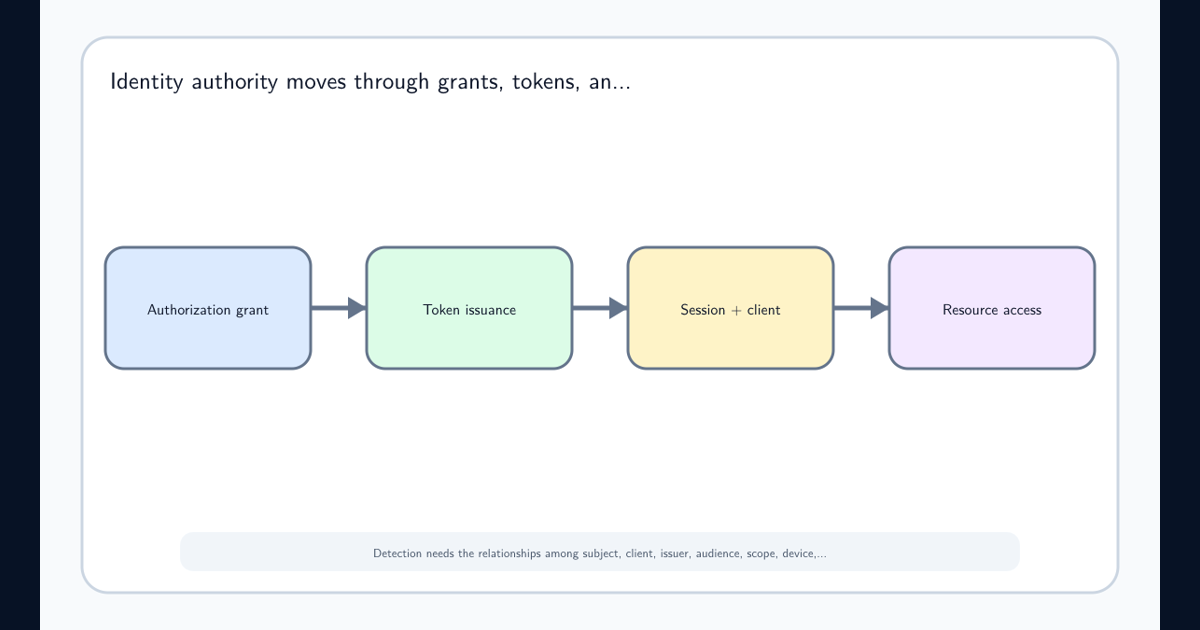
OAuth device code phishing succeeds because the person completing authentication and the client receiving the tokens are on different devices. The victim may use the real Microsoft sign-in page, satisfy multifactor authentication, and see a familiar application name. None of those facts proves that the client polling for the result is a device the victim intended to authorize.
The legitimate OAuth device authorization grant exists for input-constrained systems such as shared displays, meeting-room devices, printers, and command-line clients. Under RFC 8628, a client requests a device_code and short user_code, shows the user a verification URI, and polls the token endpoint. After the user approves in a separate browser, the authorization server returns tokens to the polling client—not to the browser where approval occurred.
In the phishing variant, the attacker controls that polling client. A lure frames the user code as a meeting ID, document code, reauthentication step, or voicemail prompt. The victim crosses the authentication boundary correctly but authorizes the wrong endpoint. This is authorization-flow abuse, not evidence that Microsoft’s sign-in page or MFA was technically bypassed.
Code expiry narrows the attack window but does not remove it. Microsoft Defender Security Research documented in April 2026 that infrastructure generated codes when targets interacted with the lure, preserving the normal short lifetime and enabling automated polling. Treat a valid, recent code as part of the social-engineering mechanism rather than a trust signal.
Start with the grant, then widen to the session
Begin in Microsoft Entra sign-in logs with AuthenticationProtocol = deviceCode. Record the user, time, correlation ID, application ID and name, resource, source IP, location, device details, Conditional Access result, authentication methods, and risk fields. The SigninLogs schema documents these fields, but availability varies by export path and licensing.
The following is an authored teaching artifact, not live threat intelligence and not an exact export from every tenant. It shows the shape of evidence an analyst should preserve:
{
  "createdDateTime": "2026-11-10T09:14:22Z",
  "userPrincipalName": "[email protected]",
  "authenticationProtocol": "deviceCode",
  "appDisplayName": "Microsoft Office",
  "appId": "<client-id>",
  "resourceDisplayName": "Microsoft Graph",
  "ipAddress": "198.51.100.27",
  "conditionalAccessStatus": "success",
  "correlationId": "<correlation-guid>",
  "deviceDetail": {"deviceId": "", "operatingSystem": "Windows"},
  "riskLevelDuringSignIn": "none"
}
success, a known Microsoft client, or riskLevelDuringSignIn: none cannot close the case. Public-client identifiers can be used outside the organization, risk scoring can lag, and an attacker may use regionally appropriate infrastructure. An empty device ID is context, not proof. Establish whether the user had a legitimate reason to activate a meeting-room device, CLI, shared display, or other approved client at that time.
Then pivot forward. Review token-backed access to Microsoft Graph, Exchange Online, SharePoint, and other resources; new device registrations; inbox-rule changes; mail searches and downloads; OAuth grants; unusual application use; and messages sent from the account. Review the sign-in detail’s Original transfer method because protocol tracking can identify later activity derived from a device-code session even when the current event is not labeled deviceCode.
Build a hunt that produces explainable cases
A useful hunt first inventories all device-code use, then adds context. The following KQL is a starting point for Microsoft Sentinel environments receiving Entra SigninLogs; validate field population and retention in your own workspace before operational use:
let lookback = 30d;
SigninLogs
| where TimeGenerated >= ago(lookback)
| where AuthenticationProtocol =~ "deviceCode"
| extend DeviceId = tostring(DeviceDetail.deviceId),
         OS = tostring(DeviceDetail.operatingSystem),
         Country = tostring(LocationDetails.countryOrRegion)
| summarize FirstSeen=min(TimeGenerated),
            LastSeen=max(TimeGenerated),
            Attempts=count(),
            Successful=countif(ResultType == 0),
            IPs=make_set(IPAddress, 10),
            Countries=make_set(Country, 10),
            Devices=make_set(DeviceId, 10),
            Resources=make_set(ResourceDisplayName, 10)
  by UserPrincipalName, AppId, AppDisplayName, CorrelationId
| order by LastSeen desc
Do not turn AuthenticationProtocol == deviceCode into a high-severity alert by itself. Compare results with an approved-use register: application/client ID, business owner, permitted users, expected resource, device class, network or named location, time pattern, and change ticket. Raise confidence when the grant is rare for the user, the client-resource pair is unapproved, the source is inconsistent with legitimate deployment, or high-impact follow-on actions occur.
Use at least two evidence planes where possible. Email or web telemetry can show the lure and verification URL; Entra records the grant; resource audit logs show the consequence. The same sign-in can produce multiple Log Analytics records that share a correlation ID, so group the sequence and use the final status rather than treating each intermediate record as an independent attack.
Detection assurance requires testing known legitimate activation paths as well as a controlled defensive simulation. A simulation must be labeled as authored test activity, use approved accounts and scopes, avoid collecting real tokens outside the authorized environment, and verify that the alert explains why the sequence is unusual. It is not evidence that a live campaign targeted the organization.
Contain the authorization chain, not only the lure
When evidence supports unauthorized device-code use, preserve the sign-in, audit, message, URL, and resource records before short-retention data disappears. Record the exact user, client, resource, scopes where visible, correlation IDs, IPs, devices, token-backed activity, and the time containment began.
Revoke the user’s sessions and refresh tokens. Microsoft documents that the revokeSignInSessions operation can take a few minutes to take effect. Existing access tokens can also remain usable until enforcement or expiry. For active hands-on compromise, temporarily disabling the account can reduce that exposure, but it interrupts legitimate work and must follow the organization’s incident authority and recovery process.
Review and remove unauthorized device registrations, inbox rules, forwarding, OAuth grants, application consents, authentication-method changes, and persistence created after the suspicious grant. Search for messages sent from the compromised mailbox because internal recipients may trust a lure from a colleague. Examine the resources the token actually reached; do not assume that session revocation reverses data access or business actions already completed.
A password reset is appropriate when credential exposure is possible or policy requires it, but device-code phishing does not inherently disclose the password. Likewise, completing passkey or FIDO authentication does not prove the grant was intended. The response objective is to invalidate delegated access, remove persistence, determine consequences, and restore the user through a verified channel.
Continue with a broader session hijacking investigation when the token lifetime, resource access, or revocation boundary is unclear.
Move from report-only evidence to a narrow allow model
Microsoft recommends blocking device code flow wherever possible. In Conditional Access, the authentication flows condition can target device code flow and retains protocol-tracking state across later token use. That makes the control stronger than filtering only the initial sign-in event.
Start with report-only evaluation and an inventory period long enough to capture infrequent legitimate activations. Identify meeting-room and Teams devices, shared displays, command-line clients, device registration workflows, break-glass considerations, service owners, and support procedures. Microsoft specifically warns that policies targeting all resources can affect Device Registration Service when device code flow is used for registration; validate the dependency rather than copying a broad exclusion into every tenant.
The safer target state is deny by default with explicit, reviewed exceptions bounded by user or group, client/resource, device type, network location, and business owner. An exception for “all employees” or an entire trusted network restores much of the attack surface. Re-test exceptions after client changes and inspect Original transfer method when troubleshooting apparently unrelated blocks caused by protocol tracking.
Staged enforcement protects both security and availability: report-only, owner confirmation, pilot group, exception validation, monitored rollout, then periodic recertification. Document the rollback condition before enforcement. Conference-room outages and blocked administrative workflows are foreseeable operational risks, not reasons to leave an unnecessary authorization path open indefinitely.
Make the final judgment explicit and bounded
A defensible case separates observation from assessment. Observation: a user completed a device-code grant for a particular client and resource, followed by Graph access and an inbox-rule change from infrastructure outside the approved pattern. Assessment: the sequence is highly likely to represent unauthorized authorization. Unknown: whether the user disclosed any other information, which data the actor viewed beyond available audit coverage, and whether every issued access token has expired.
Avoid the opposite errors of treating every device-code event as compromise or accepting every successful MFA event as legitimate. The control-plane authorization question is whether this client was entitled to receive this user’s delegated authority for this resource and purpose. That reasoning connects naturally to OAuth grant and token detection and the governance lifecycle described in OAuth consent and connected applications.
Next step: use those two resources to build a tenant-specific inventory of grants, clients, token lifetimes, revocation boundaries, and approved device-code use. Then validate one legitimate activation and one authorized defensive simulation against the hunt and report-only policy. The outcome should be an explainable allow model, not a larger collection of untriaged device-code alerts.
Frequently asked questions
Does phishing-resistant MFA stop OAuth device code phishing?
Not by itself. The user can complete strong authentication on the legitimate identity-provider page while unknowingly authorizing an attacker-controlled device client. Restrict the flow, verify the application and device context, and investigate device-code sign-ins.
Is every device code sign-in malicious?
No. Shared displays, meeting-room systems, command-line tools, and other input-constrained clients can use the flow legitimately. Establish an approved baseline and correlate the client, resource, user, network, device, and follow-on activity.