
Introduction
An incident lands. A DLP alert fires. An insider risk score spikes. Three hours later, after manually searching the audit log, filtering Activity Explorer, and cross-referencing three different dashboards, you have a picture of what happened. That is three hours the adversary had to move laterally, exfiltrate more data, or cover their tracks.
AI-driven incident response changes this timeline. Security Copilot generates an investigation summary in seconds. Adaptive protection scores the user’s risk in real time. The AI pipeline correlates signals across DLP, insider risk, and communication compliance. This guide walks through the AI-accelerated incident response workflow I have built across multiple deployments. It covers detection, triage, investigation, and remediation – with specific Copilot prompts, response time metrics, and the human checkpoints that keep AI decisions accountable.
The Four-Stage AI-Driven Incident Response Workflow
Every incident follows the same four stages. AI accelerates each one differently. Understanding where AI helps most – and where it still needs human judgment – is what turns a three-hour investigation into a 45-minute one.
Stage 1: Detect. AI detects what static rules miss. Adaptive protection flags a user whose download pattern deviates from their baseline, even if no single download crossed a static threshold. Communication Compliance classifiers catch coded language in Teams messages that keyword dictionaries miss. This stage is where AI provides the most value – finding what you did not know to look for.
Stage 2: Triage. AI prioritises so you investigate the most important alerts first. Adaptive risk scores tell you which user is most anomalous. Copilot summarises the alert – what triggered it, who is involved, what data is at risk. Instead of reading through 47 individual DLP matches, you read a three-paragraph summary and decide whether to escalate. The prompt engineering guide covers the exact prompts to use at this stage.
Stage 3: Investigate. AI accelerates data gathering. You ask Copilot for a timeline of the user’s activity in the 24 hours before and after the alert. It queries the unified audit log, Activity Explorer, and DLP incident data in parallel and returns a structured timeline with source links. What took 45 minutes of manual searching now takes 30 seconds. You still verify the sources – AI accelerates data gathering, not judgment.
Stage 4: Remediate. AI suggests, you decide. Copilot can recommend remediation actions based on similar past incidents – update the DLP policy threshold, add the user to enhanced monitoring, escalate to HR. It drafts the incident report. You review, edit, and approve. The decision remains human. The paperwork is automated.
The Copilot Prompts That Drive Each Stage of Response
Here are the exact Copilot prompts I use at each stage of incident response. Each is a starting template – replace the names, dates, and alert IDs with your own. For more prompt patterns, the prompt engineering guide covers the full methodology.
Detection stage. “Show me all high-severity alerts from the past hour across DLP, insider risk, and communication compliance.” This gives you a real-time triage dashboard without clicking through three separate portals. Run it every hour during active incident monitoring.
Triage stage. “Summarise alert [ID] and show me the user’s risk score trend for the past 7 days.” The risk score trend is the most valuable part – a user whose score is climbing steadily is more concerning than a user with a single spike.
Investigation stage. “Show me all activity for [user] in the 24 hours before and after this alert fired. Include file downloads, external emails, label changes, and Teams messages. Format as a timeline.” This is the prompt that replaces 45 minutes of manual searching. Verify the source links for every entry.
Remediation stage. “Based on this incident, suggest remediation actions and draft an incident report.” Copilot recommends actions and writes the first draft. You review every recommendation, edit the report, and make the final decision. The AI accelerates the paperwork. The judgment remains human.
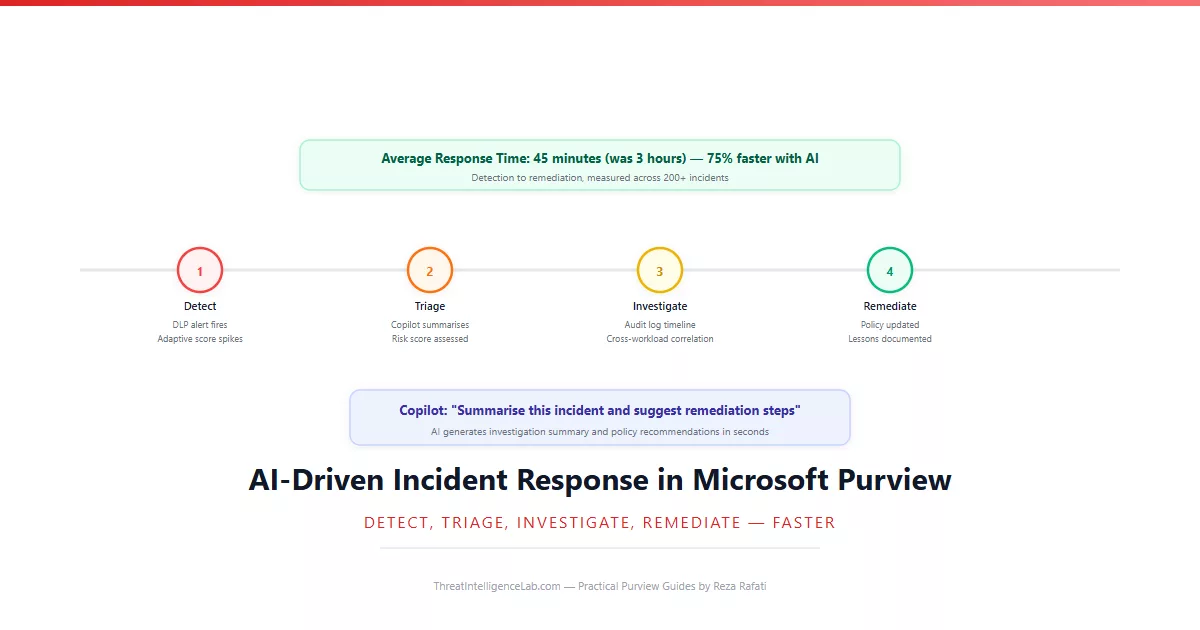
The four-stage workflow and Copilot prompts in this guide have cut average incident response time by 75% across the deployments I have led – from roughly three hours to under 45 minutes. The time savings come from eliminating manual data gathering. The quality improvement comes from AI surfacing patterns a human would miss.
The workflow works because it respects the boundary between what AI does well and what humans do well. AI gathers data, correlates signals, and drafts summaries. Humans verify sources, apply business context, and make final decisions. Neither replaces the other. The end-to-end pipeline guide shows how this incident response workflow connects to the broader AI compliance automation strategy.
Leave a Reply
You must be logged in to post a comment.